


01.Bastion-Server 통해 nginx2a/nginx2c 으로 접속

이 상태에서 아래와 같은 명령어를 통해 Tomcat이나 Nginx에 접속하여 사용한다.
1.
단, 사전에 Bastion-Server 가 접속하고자하는 서버의 powermvp.pem 키에 대한 복사 필요
2.
사전에 인바운드 보안정책에서 Port 22 개방 필요
ssh -i powermvp.pem ubuntu@10.250.1.240
ssh -i powermvp.pem ubuntu@10.250.11.240
ssh -i powermvp.pem ubuntu@10.250.2.240
ssh -i powermvp.pem ubuntu@10.250.12.240

사전에 먼저 Bastion-Server에서 아래 작업을 진행한다.

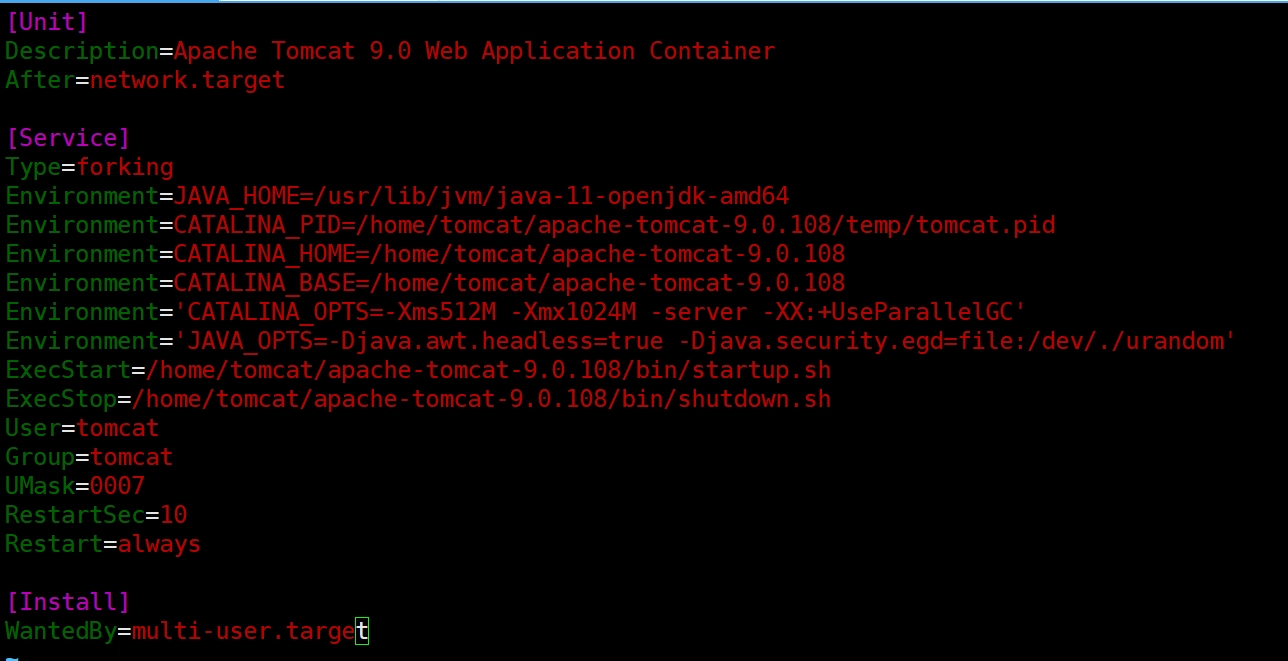
SFTP로 생성한 pem를 이동시키기 (로컬서버 → Bastion EC2로 이동)

펨키를 사용하여 원격접속을 할 수 있음
chmod 400 (자신의 펨키 이름)
Shell
복사
ssh -i (자신의 펨키 이름) ubuntu@10.250.1.240
Shell
복사
AWS 에서 일반적인 서버간 연결 방법
→ ssh -i powermvp.pem ubuntu@10.250.1.240 (Ubuntu Linux계정)
→ ssh -i powermvp.pem ec2-user@10.250.1.240 (AWS Linux계정)

exit
Shell
복사

 사용에 편의성을 위해 config 설정을 통해 서버간 간편 연결 방법 (참고사항)
vi ~/.ssh/config
JavaScript
복사
파일 새로 생성 후 아래 내용 붙여넣기
Host nginx2a
HostName 10.250.1.240
User ubuntu
IdentityFile ~/.ssh/powermvp.pem
StrictHostKeyChecking no
UserKnownHostsFile /dev/null
Host nginx2c
HostName 10.250.11.240
User ubuntu
IdentityFile ~/.ssh/powermvp.pem
StrictHostKeyChecking no
UserKnownHostsFile /dev/null
Host tomcat2a
HostName 10.250.2.240
User ubuntu
IdentityFile ~/.ssh/powermvp.pem
StrictHostKeyChecking no
UserKnownHostsFile /dev/null
Host tomcat2c
HostName 10.250.12.240
User ubuntu
IdentityFile ~/.ssh/powermvp.pem
StrictHostKeyChecking no
UserKnownHostsFile /dev/null
JavaScript
복사

자신의 펨키를 안전하게 .ssh/ 디렉터리로 이동
mv powermvp.pem ~/.ssh/
JavaScript
복사

config 설정을 마쳤으므로 아래 명령어로 WEB EC2로 접속
ssh nginx2a
JavaScript
복사
ssh nginx2c
JavaScript
복사
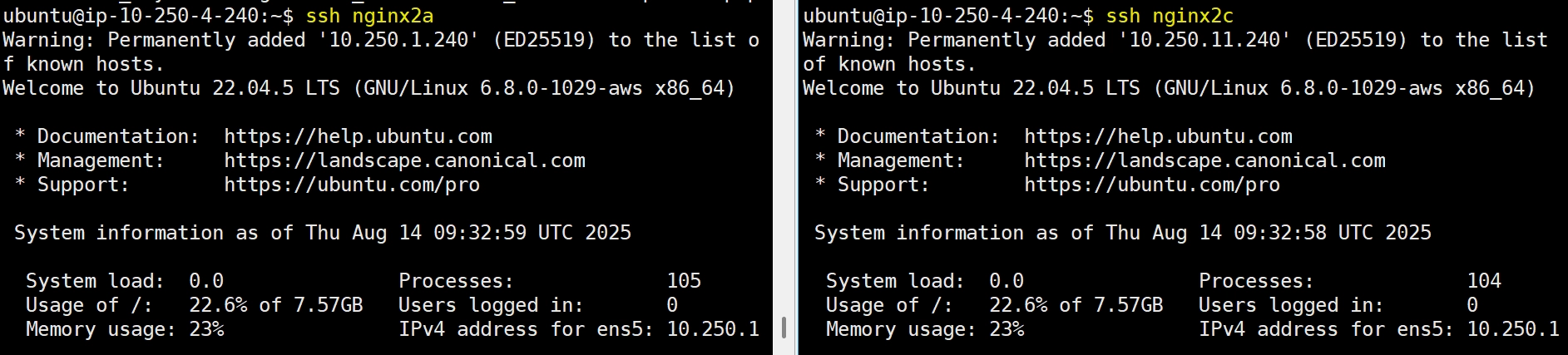

02. Bastion-Server 접속후 NGINX 설치 (nginx-2a, nginx-2c 모두에서 진행)
1) XShell 설치 및 SSH 접속
XShell 설치경로 : https://www.netsarang.com/ko/xshell-download/
설치 후 아래와 같이 작성 → 순서를 위해 Tomcat 서버와 연결
•
연결
이름 | nginx-2a |
호스트 | (퍼블릭 IPv4 주소) |
포트 번호 | 22 |

•
사용자 인증
사용자 이름 | ubuntu |
방법 | Public key |
키파일 | (생성한 키페어) |
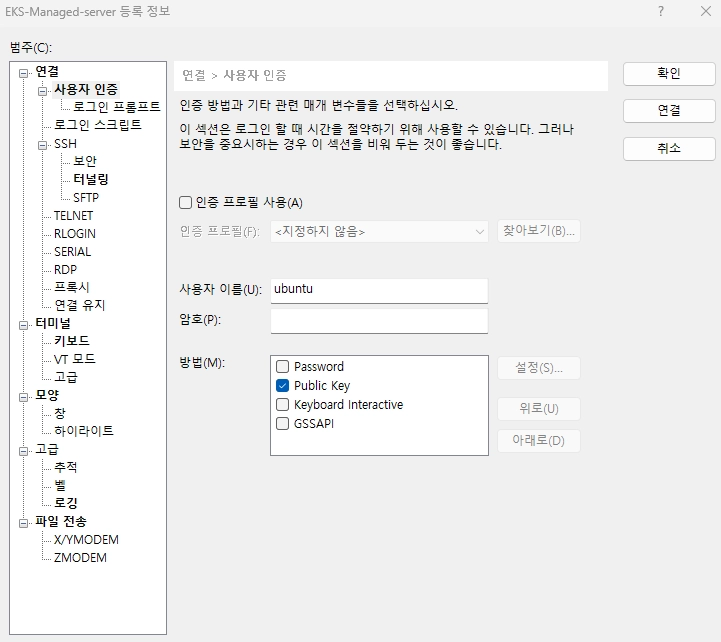


위와 같이 Public Key 가져오면 SSH 연결 시행
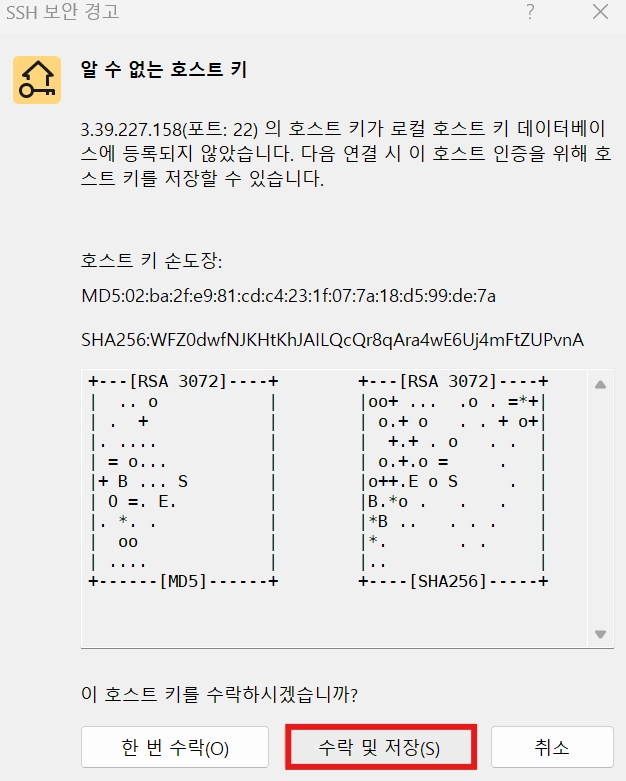
이와 같은 방식으로 ‘VEC-PRD-VPC-NGINX-PUB-2A’, ‘VEC-PRD-VPC-NGINX-PUB-2C’ 모두 등록


2) 만약 nginx web-server 가 Private Subnet에 존재한다면 Bastion-Server 를 통해 연결 후 작업 진행
ssh -i powermvp.pem ubuntu@10.250.1.240
YAML
복사
ssh -i powermvp.pem ubuntu@10.250.11.240
YAML
복사
3) Nginx WEB-Server 설치 순서
[#0번작업] : Nginx 설치 가능한 버전 확인
apt info nginx 명령어로 name이 포함된 설치 가능한 패키지 목록을 조회한다.
sudo -i
YAML
복사
apt info nginx
YAML
복사

[#1번작업] : 저장소 파일 생성 및 내용 넣기
[root@ip-10-250-1-240]$ sudo vi /etc/apt/sources.list.d/nginx.list
sudo vi /etc/apt/sources.list.d/nginx.list
YAML
복사
아래 코드 내용 복사하여 넣기
deb [signed-by=/usr/share/keyrings/nginx-archive-keyring.gpg] https://nginx.org/packages/ubuntu jammy nginx
deb-src [signed-by=/usr/share/keyrings/nginx-archive-keyring.gpg] https://nginx.org/packages/ubuntu jammy nginx
Shell
복사

[#2번작업] : GPG 키 추가
[root@ip-10-250-1-240]$ curl -fsSL https://nginx.org/keys/nginx_signing.key | sudo gpg --dearmor -o /usr/share/keyrings/nginx-archive-keyring.gpg
curl -fsSL https://nginx.org/keys/nginx_signing.key | sudo gpg --dearmor -o /usr/share/keyrings/nginx-archive-keyring.gpg
YAML
복사
Warning: apt-key is deprecated. Manage keyring files in trusted.gpg.d instead (see apt-key(8)).
OK
[#3번작업] : 저장소 업데이트 및 설치
[root@ip-10-250-1-240]$ sudo apt update
sudo apt update
YAML
복사
[#4번작업] : nginx 설치
[root@ip-10-250-1-240]$ sudo apt install nginx
sudo apt install nginx
YAML
복사

[#5번작업] : 설치 버전확인
[root@ip-10-250-1-240]$ nginx -v
nginx -v
YAML
복사
nginx version: nginx/1.30.3

[#6번작업] : nginx 시작
[root@ip-10-250-11-240]$sudo systemctl start nginx
sudo systemctl start nginx
YAML
복사
[#7번작업] : nginx 상태 확인
[root@ip-10-250-11-240]$ sudo systemctl status nginx
sudo systemctl status nginx
YAML
복사
● nginx.service - nginx - high performance web server
Loaded: loaded (/lib/systemd/system/nginx.service; enabled; vendor preset: enabled)
Active: active (running) since Sun 2025-07-06 11:54:28 UTC; 3s ago
Docs: https://nginx.org/en/docs/
Process: 2987 ExecStart=/usr/sbin/nginx -c ${CONFFILE} (code=exited, status=0/SUCCESS)
Main PID: 2988 (nginx)
Tasks: 2 (limit: 1129)
Memory: 3.4M
CPU: 10ms
CGroup: /system.slice/nginx.service
├─2988 "nginx: master process /usr/sbin/nginx -c /etc/nginx/nginx.conf"
└─2989 "nginx: worker process" "" "" "" "" "" "" "" "" "" "" "" "" "" "" "" "" "" "" ""
Jul 06 11:54:28 ip-10-250-1-240 systemd[1]: Starting nginx - high performance web server...
Jul 06 11:54:28 ip-10-250-1-240 systemd[1]: Started nginx - high performance web server.
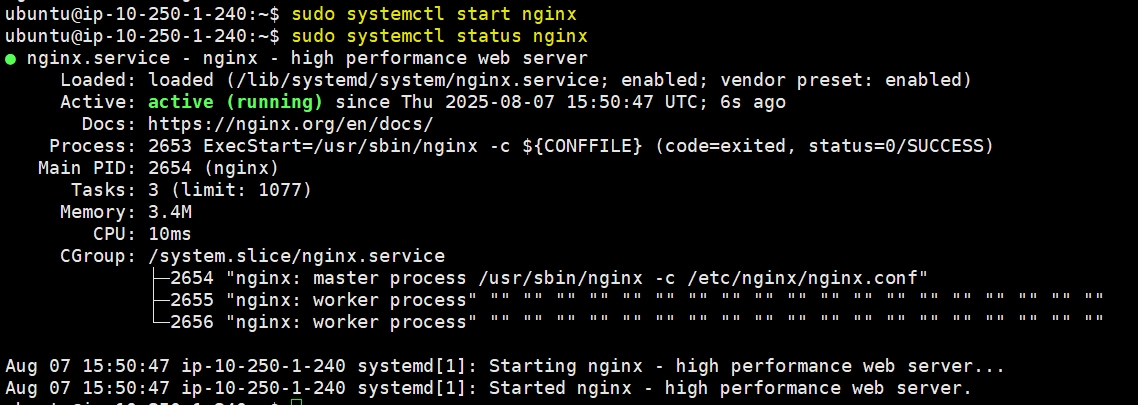
http://[Web서버 공인아이피] nginx 홈페이지가 뜨는지 확인한다.

===========================================================
[여기서 잠깐]
 이번에는 위에서 설치한 nginx-2a , nginx-2c 2대의 EC2를 ELB에 붙여보기 위해
[09]. ELB 설치_LoadBalancer 설치 로 이동하여 나머지를 구성후 다시 돌아 옵시다.
ELB 설치 구성하는 목적 3가지첫째, 서버에 대한 부하분산
둘째, Health Check (건강한 서버에만 트래픽을 전달하겠다)
셋째, Autoscaling 구성 (서버 부하시 자동적인 서버증가를 통해 안정적인 트래픽 소화)
===========================================================
03. nginx Web-server index.html 수정

VEC-PRD-VPC-NGINX-PUB-2A 에서 진행 (root 로 이동하여 작업 진행)
sudo -i
YAML
복사
: 아래 html 내용 복사하여 붙여넣고 :wq로 저장
vi /usr/share/nginx/html/index.html
JavaScript
복사
<html>
<head>
<title>Amazon Nginx-2A Connected Success !!!</title>
<style>
body {margin-top: 40px; background-color: red;}
</style>
</head>
<body>
<div style=color:white;text-align:center>
<h1>Amazon Nginx-2A Connected Success !!!</h1>
<h2>Congratulations!</h2>
<p><em>Your application is now running on a container in Amazon EC2.</em></p>
</p> </div>
</body>
</html>
Shell
복사

VEC-PRD-VPC-NGINX-PUB-2C 에서 진행 (root로 이동하여 작업 진행)
sudo -i
YAML
복사
: 아래 html 내용 복사하여 붙여넣고 [ESC]+ :wq로 저장
vi /usr/share/nginx/html/index.html
JavaScript
복사
<html>
<head>
<title>Amazon Nginx-2C Connected Success !!!</title>
<style>
body {margin-top: 40px; background-color: blue;}
</style>
</head>
<body>
<div style=color:white;text-align:center>
<h1>Amazon Nginx-2C Connected Success !!!</h1>
<h2>Congratulations!</h2>
<p><em>Your application is now running on a container in Amazon EC2.</em></p>
</p> </div>
</body>
</html>
Shell
복사

공인 IP로 접속 시 아래처럼 나옴


04. 새로 설치한 Nginx Web-Server 결과를 ELB(ALB) 확인하기
[EC2] - [대상그룹]에서 전날 생성한 ‘VEC-PRD-ALB-TG’ 대상그룹 클릭하여
[대상] - [대상 등록] 클릭
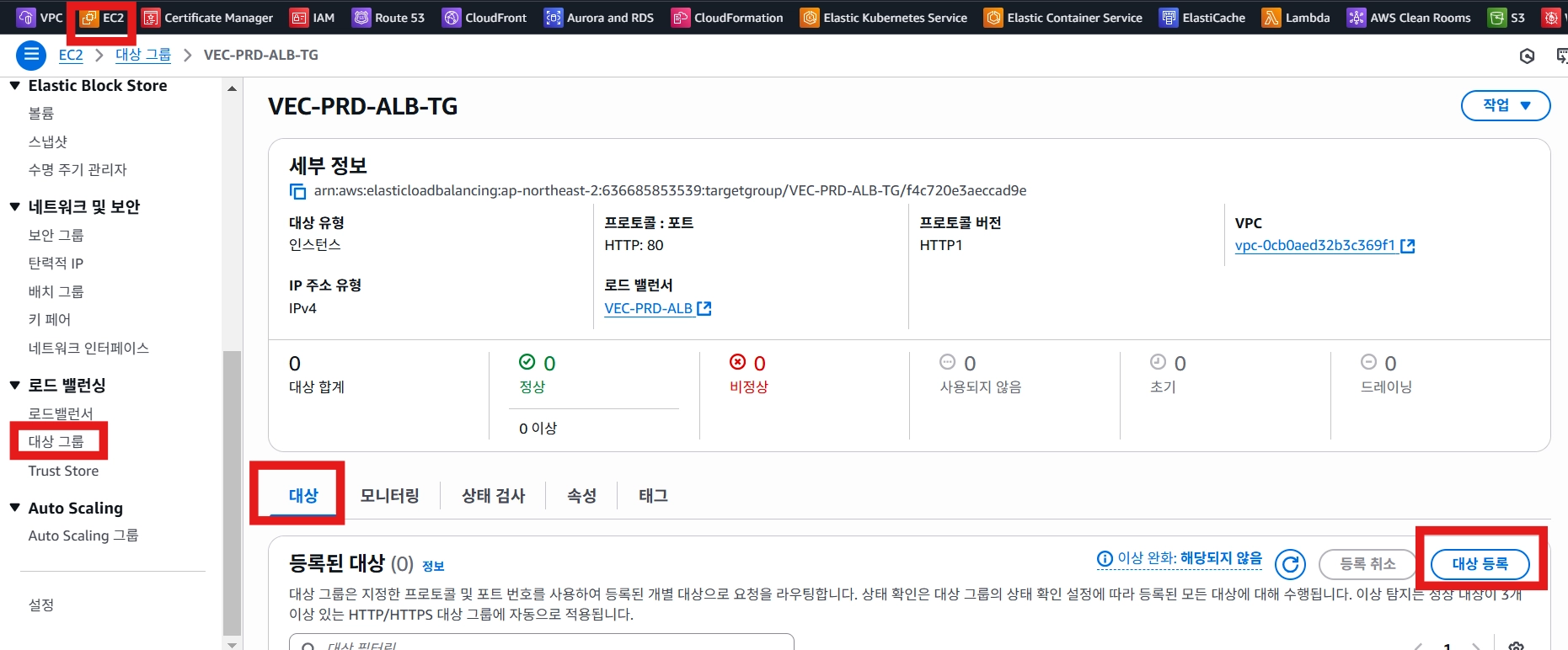
[대상 등록]에서 이전에 생성한 EC2 선택 후 [아래에 보류 중인 것으로 포함] 클릭
•
VEC-PRD-VPC-NGINX-PUB-2A
•
VEC-PRD-VPC-NGINX-PUB-2C

VEC-PRD-ALB DNS 접속시 아래와 같이 라운드로빈 방식으로 Nginx-2A , Nginx-2C 연결이 된다.
ALB 도메인으로 접속하면 정상적으로 nginx가 설치된 것을 확인할 수 있음
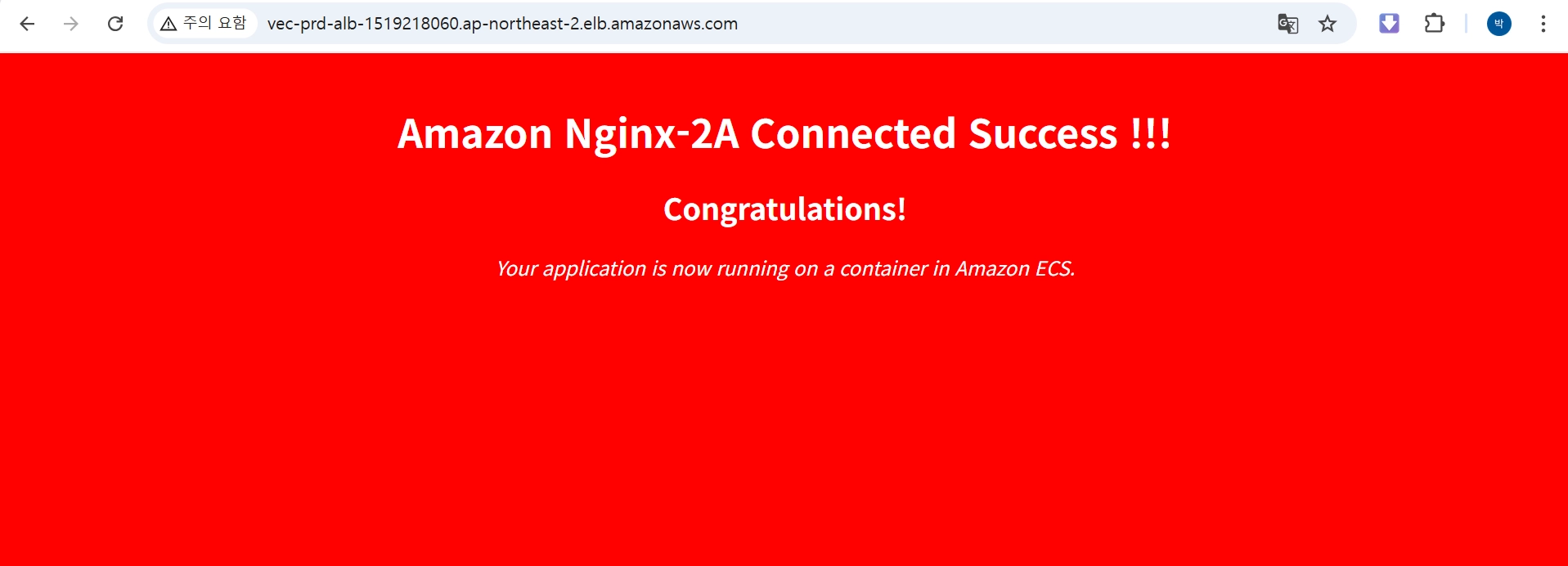

각자 Route53 등록되어 있는 도메인으로도 화면이 잘 뜬다.


05. Bastion-Server 접속후 TOMCAT 설치 (Tomcat2a, Tomcat2c 모두 설치)
[#0번작업] : JDK, Tomcat 설치 가능한 버전 확인
apt openjdk 명령어로 name이 포함된 설치 가능한 패키지 목록을 조회한다.
sudo -i
sudo -i
YAML
복사
[#1번작업]
[root@ip-10-250-2-240]$ apt search openjdk
apt search openjdk
YAML
복사
Sorting... Done
Full Text Search... Done
default-jdk/jammy 2:1.11-72build2 amd64
Standard Java or Java compatible Development Kit
default-jdk-doc/jammy 2:1.11-72build2 amd64
Standard Java or Java compatible Development Kit (documentation)
default-jdk-headless/jammy 2:1.11-72build2 amd64
Standard Java or Java compatible Development Kit (headless)
default-jre/jammy 2:1.11-72build2 amd64
Standard Java or Java compatible Runtime
default-jre-headless/jammy 2:1.11-72build2 amd64
Standard Java or Java compatible Runtime (headless)
openjdk-11-dbg/jammy-updates,jammy-security 11.0.27+6~us1-0ubuntu1~22.04 amd64
Java runtime based on OpenJDK (debugging symbols)
openjdk-11-doc/jammy-updates,jammy-security 11.0.27+6~us1-0ubuntu1~22.04 all
OpenJDK Development Kit (JDK) documentation
openjdk-11-jdk/jammy-updates,jammy-security 11.0.27+6~us1-0ubuntu1~22.04 amd64
OpenJDK Development Kit (JDK)
openjdk-11-jdk-headless/jammy-updates,jammy-security 11.0.27+6~us1-0ubuntu1~22.04 amd64
OpenJDK Development Kit (JDK) (headless)
openjdk-11-jre/jammy-updates,jammy-security 11.0.27+6~us1-0ubuntu1~22.04 amd64
OpenJDK Java runtime, using Hotspot JIT
openjdk-11-jre-headless/jammy-updates,jammy-security 11.0.27+6~us1-0ubuntu1~22.04 amd64
OpenJDK Java runtime, using Hotspot JIT (headless)
openjdk-11-source/jammy-updates,jammy-security 11.0.27+6~us1-0ubuntu1~22.04 all
OpenJDK Development Kit (JDK) source files

[root@ip-10-250-11-240]$ sudo apt update
sudo apt update
YAML
복사

 자바11 설치
아래 명령어를 입력하면 의존관계를 조회하고, 계속 설치를 진행할 것인지 묻는다.
y를 입력하면 의존관계를 다운로드하고 설치를 진행한다.
[#2번작업]
[root@ip-10-250-2-240]$ sudo apt install openjdk-11-jdk -y
sudo apt install openjdk-11-jdk -y
YAML
복사

설치진행 화면 생략
[#3번작업] : 자바 버전 확인
java -version 명령어로 설치된 자바 버전을 확인한다.
[root@ip-10-250-2-240]$ java -version
java -version
YAML
복사
openjdk version "11.0.28" 2025-07-15
OpenJDK Runtime Environment (build 11.0.28+6-post-Ubuntu-1ubuntu122.04.1)
OpenJDK 64-Bit Server VM (build 11.0.28+6-post-Ubuntu-1ubuntu122.04.1, mixed mode, sharing)
[#4번작업] : 자바 컴포넌트 버전 확인
[root@ip-10-250-2-240]$ javac -version
javac -version
YAML
복사
javac 11.0.28

==================================환경변수 설정 (아래 #5번작업 ~ #10번작업까지 : 실행 안해줘도 된다)
[root@ip-10-250-11-240]$ echo $JAVA_HOME
echo $JAVA_HOME
YAML
복사
[#5번작업]
설치 경로 확인
which 와 readlink 명령어를 통해 java와 javac가 설치된 경로를 확인한다.
아래명령어 실행
[root@ip-10-250-2-240]$ which java
which java
YAML
복사
[ec2-user ~]$ readlink -f /usr/bin/java
readlink -f /usr/bin/java
YAML
복사
[#6번작업]
아래명령어 실행
[root@ip-10-250-2-240]$ which javac
which javac
YAML
복사
[root@ip-10-250-2-240]$ readlink -f /usr/bin/javac
readlink -f /usr/bin/javac
YAML
복사
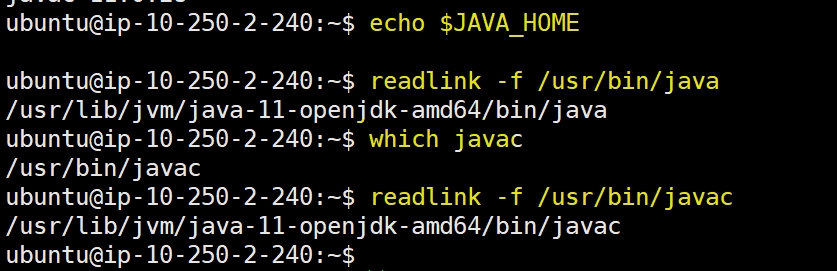
환경변수 추가
export 명령어로 바로 환경변수에 추가할 수 있지만, 1회성으로 시스템 재시작 시 초기화된다.
[#7번작업]
[root@ip-10-250-2-240]$ export JAVA_HOME=/usr/lib/jvm/java-11-openjdk-amd64
export JAVA_HOME=/usr/lib/jvm/java-11-openjdk-amd64
YAML
복사
[root@ip-10-250-2-240]$ export PATH=$PATH:$JAVA_HOME/bin
export PATH=$PATH:$JAVA_HOME/bin
YAML
복사
[root@ip-10-250-2-240]$ export CLASSPATH=$JAVA_HOME/lib/tools.jar
export CLASSPATH=$JAVA_HOME/lib/tools.jar
YAML
복사
echo 명령어로 등록한 환경변수 경로를 확인한다.
[#8번작업]
[root@ip-10-250-2-240]$ echo $JAVA_HOME
echo $JAVA_HOME
YAML
복사
/usr/lib/jvm/java-2-openjdk-amd64
[#9번작업]
[root@ip-10-250-2-240]$ echo $PATH
echo $PATH
YAML
복사
/usr/local/sbin:/usr/local/bin:/usr/sbin:/usr/bin:/sbin:/bin:/usr/games:/usr/local/games:/snap/bin:/usr/lib/jvm/java-11-openjdk-amd64/bin
[#10번작업]
[root@ip-10-250-2-240]$ echo $CLASSPATH
echo $CLASSPATH
YAML
복사
/usr/lib/jvm/java-2-openjdk-amd64/lib/tools.jar

============================================================================= [#11번 작업부터 본격적으로 진행]
[#11번 작업]
[root@ip-10-250-2-240]$ sudo vim /etc/profile
sudo vim /etc/profile
YAML
복사
export JAVA_HOME=/usr/lib/jvm/java-11-openjdk-amd64
export PATH=$PATH:$JAVA_HOME/bin
export CLASSPATH=$JAVA_HOME/lib/tools.jar
JavaScript
복사
아래경로를 참고하여
/usr/lib/jvm/java-1.8.0-openjdk-1.8.0.432.b06-1.amzn2.0.1.x86_64

(AWS) Ubuntu 24.04 버전에 Tomcat 9 설치하기
[#12번 작업]
[root@ip-10-250-2-240]$ apt list | grep tomcat
apt list | grep tomcat
YAML
복사

설치가능한 tomcat 패키지 목록
톰캣 웹사이트에서 9.0 버전 다운로드 주소 확인
톰캣 웹사이트에 가서 9.0 버전 파일의 주소를 확인하고 다운로드한다.
[#13번 작업] : 생략가능
아파치 톰캣 웹사이트 주소: https://tomcat.apache.org/download-90.cgi → 이미 해당 버전 다운로드 링크을 아래와 같이 표기 하였으므로 실행할 필요없다.
[#14번 작업]

[주의 root에 작업한다]
root@ip-10-250-2-240]# wget https://archive.apache.org/dist/tomcat/tomcat-9/v9.0.108/bin/apache-tomcat-9.0.108.tar.gz
wget https://archive.apache.org/dist/tomcat/tomcat-9/v9.0.108/bin/apache-tomcat-9.0.108.tar.gz
YAML
복사
•
-2025-08-14 10:13:49-- https://archive.apache.org/dist/tomcat/tomcat-9/v9.0.108/bin/apache-tomcat-9.0.108.tar.gz
Resolving archive.apache.org (archive.apache.org)... 65.108.204.189, 2a01:4f9:1a:a084::2
Connecting to archive.apache.org (archive.apache.org)|65.108.204.189|:443... connected.
HTTP request sent, awaiting response... 200 OK
Length: 13028093 (12M) [application/x-gzip]
Saving to: ‘apache-tomcat-9.0.108.tar.gz’
apache-tomcat-9.0.108.tar.gz 100%[===========================================================>] 12.42M 3.36MB/s in 5.2s
2025-08-14 10:13:56 (2.40 MB/s) - ‘apache-tomcat-9.0.108.tar.gz’ saved [13028093/13028093]

100%[===================================================================================================================>] 12,716,365 --.-K/s in 0.1s
2024-11-08 09:51:50 (89.2 MB/s) - ‘apache-tomcat-9.0.96.tar.gz’ saved [12716365/12716365]
[#15번 작업]
[root@ip-10-250-2-240]# ls
ls
YAML
복사
apache-tomcat-9.0.102.tar.gz
[#16번 작업]
[root@ip-10-250-2-240]# sudo groupadd tomcat
sudo groupadd tomcat
YAML
복사
[#16-1번 작업]
[root@ip-10-250-2-240]# sudo mkdir /home/tomcat
sudo mkdir /home/tomcat
YAML
복사
[#16-2번 작업]
[root@ip-10-250-2-240]# sudo tar -xf apache-tomcat-9.0.108.tar.gz -C /home/tomcat/
sudo tar -xf apache-tomcat-9.0.108.tar.gz -C /home/tomcat/
YAML
복사
[#16-3번 작업]
[root@ip-10-250-2-240]# sudo useradd -s /usr/sbin/nologin -g tomcat -d /home/tomcat tomcat
sudo useradd -s /usr/sbin/nologin -g tomcat -d /home/tomcat tomcat
YAML
복사
[#16-4번 작업]
root@ip-10-250-2-240:/# ls /home/tomcat/apache-tomcat-9.0.108/
ls /home/tomcat/apache-tomcat-9.0.108/
YAML
복사
apache-tomcat-9.0.102/conf/
apache-tomcat-9.0.102/conf/catalina.policy
apache-tomcat-9.0.102/conf/catalina.properties
apache-tomcat-9.0.102/conf/context.xml
apache-tomcat-9.0.102/conf/jaspic-providers.xml
apache-tomcat-9.0.102/conf/jaspic-providers.xsd
apache-tomcat-9.0.102/conf/logging.properties
apache-tomcat-9.0.102/conf/server.xml
apache-tomcat-9.0.102/conf/tomcat-users.xml
apache-tomcat-9.0.102/conf/tomcat-users.xsd
apache-tomcat-9.0.102/conf/web.xml
apache-tomcat-9.0.102/bin/
apache-tomcat-9.0.102/lib/
apache-tomcat-9.0.102/logs/
apache-tomcat-9.0.102/temp/
apache-tomcat-9.0.102/webapps/
apache-tomcat-9.0.102/webapps/ROOT/
apache-tomcat-9.0.102/webapps/ROOT/WEB-INF/
apache-tomcat-9.0.102/webapps/docs/
apache-tomcat-9.0.102/webapps/docs/META-INF/

[#17번 작업]
[root@ip-10-250-2-240]# sudo vi /etc/systemd/system/tomcat.service
sudo vi /etc/systemd/system/tomcat.service
YAML
복사
•
-----------------------------------------------------------------------------복사해서 붙여놓는다.
[Unit]
Description=Apache Tomcat 9.0 Web Application Container
After=network.target
[Service]
Type=forking
Environment=JAVA_HOME=/usr/lib/jvm/java-11-openjdk-amd64
Environment=CATALINA_PID=/home/tomcat/apache-tomcat-9.0.108/temp/tomcat.pid
Environment=CATALINA_HOME=/home/tomcat/apache-tomcat-9.0.108
Environment=CATALINA_BASE=/home/tomcat/apache-tomcat-9.0.108
Environment='CATALINA_OPTS=-Xms512M -Xmx1024M -server -XX:+UseParallelGC'
Environment='JAVA_OPTS=-Djava.awt.headless=true -Djava.security.egd=file:/dev/./urandom'
ExecStart=/home/tomcat/apache-tomcat-9.0.108/bin/startup.sh
ExecStop=/home/tomcat/apache-tomcat-9.0.108/bin/shutdown.sh
User=tomcat
Group=tomcat
UMask=0007
RestartSec=10
Restart=always
[Install]
WantedBy=multi-user.target
Shell
복사
------------------------------------------------------------------------------복사해서 붙여놓는다.

[#18번 작업]
[root@ip-10-250-2-240]# sudo systemctl daemon-reload
sudo systemctl daemon-reload
YAML
복사
[#19번 작업]
[root@ip-10-250-2-240]# sudo systemctl enable tomcat.service
sudo systemctl enable tomcat.service
YAML
복사
[#20번 작업]
[root@ip-10-250-2-240]# sudo chgrp -R tomcat /home/tomcat/
sudo chgrp -R tomcat /home/tomcat/
YAML
복사
[#21번 작업]
[root@ip-10-250-2-240]# sudo chown -R tomcat /home/tomcat/
sudo chown -R tomcat /home/tomcat/
YAML
복사
[#22번 작업]
[root@ip-10-250-2-240]# sudo chmod +x /home/tomcat/apache-tomcat-9.0.108/bin/*.sh
sudo chmod +x /home/tomcat/apache-tomcat-9.0.108/bin/*.sh
YAML
복사
[#23번 작업]
[root@ip-10-250-2-240]# sudo systemctl start tomcat
sudo systemctl start tomcat
YAML
복사
[#24번 작업]
[root@ip-10-250-2-240]# ps -ef|grep tomcat
ps -ef|grep tomcat
YAML
복사
tomcat 9478 1 26 07:53 ? 00:00:02 /usr/lib/jvm/jre/bin/java -Djava.util.logging.config.file=/home/tomcat/apache-tomcat-9.0.100/conf/logging.properties -Djava.util.logging.manager=org.apache.juli.ClassLoaderLogManager -Djava.awt.headless=true -Djava.security.egd=file:/dev/./urandom -Djdk.tls.ephemeralDHKeySize=2048 -Djava.protocol.handler.pkgs=org.apache.catalina.webresources -Dsun.io.useCanonCaches=false -Dorg.apache.catalina.security.SecurityListener.UMASK=0027 -Xms256M -Xmx256M -server -XX:+UseParallelGC -Dignore.endorsed.dirs= -classpath /home/tomcat/apache-tomcat-9.0.100/bin/bootstrap.jar:/home/tomcat/apache-tomcat-9.0.100/bin/tomcat-juli.jar -Dcatalina.base=/home/tomcat/apachetomcat-9.0.100 -Dcatalina.home=/home/tomcat/apache-tomcat-9.0.100 -Djava.io.tmpdir=/home/tomcat/apache-tomcat-9.0.100/temp org.apache.catalina.startup.Bootstrap start
root 9871 6887 0 07:53 pts/0 00:00:00 grep --color=auto tomcat

[#25번 작업] : Tomcat 서비스 영구적으로 시작하기
[root@ip-10-250-2-240] # systemctl enable tomcat.service
systemctl enable tomcat.service
YAML
복사
Created symlink from /etc/systemd/system/multi-user.target.wants/tomcat.service to /etc/systemd/system/tomcat.service.
복사 클릭 버전 (참고용)
1.
Root 계정 접속 → ssh 는 원격접속이므로 tomcat2a 먼저 진행 후 tomcat2c 진행!
ssh tomcat2a
Shell
복사
ssh tomcat2c
Shell
복사
sudo -i
Shell
복사
2.
설치 가능한 JDK 버전 확인
apt search openjdk
Shell
복사

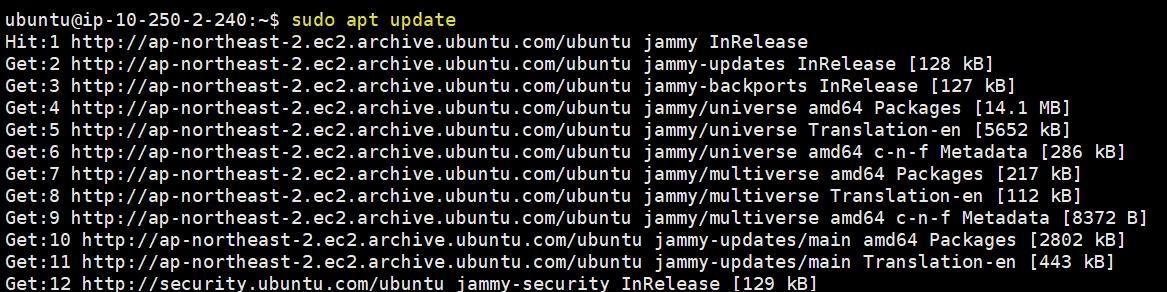
3. 패키지 업데이트
sudo apt update
Shell
복사
4.
자바 11 설치
sudo apt install openjdk-11-jdk -y
Shell
복사

5.
자바 버전 확인
export JAVA_HOME=/usr/lib/jvm/java-11-openjdk-amd64
Shell
복사
javac -version
Shell
복사

===========================================================
5.
환경변수 설정
echo $JAVA_HOME
Shell
복사
which java
Shell
복사
readlink -f /usr/bin/java
Shell
복사
which javac
Shell
복사
readlink -f /usr/bin/javac
Shell
복사

6.
환경변수 설정 및 확인
export JAVA_HOME=/usr/lib/jvm/java-11-openjdk-amd64
Shell
복사
export PATH=$PATH:$JAVA_HOME/bin
Shell
복사
export CLASSPATH=$JAVA_HOME/lib/tools.jar
Shell
복사
echo $JAVA_HOME
Shell
복사
echo $PATH
Shell
복사
echo $CLASSPATH
Shell
복사

=============================================================
7. 재기동 시 환경변수 적용하도록 설정
sudo vim /etc/profile
Shell
복사
export JAVA_HOME=/usr/lib/jvm/java-11-openjdk-amd64
export PATH=$PATH:$JAVA_HOME/bin
export CLASSPATH=$JAVA_HOME/lib/tools.jar
JavaScript
복사

8.
설치 가능한 톰캣 버전 확인하기
apt list | grep tomcat
Shell
복사

9.
톰캣 설치 파일 다운로드
wget https://archive.apache.org/dist/tomcat/tomcat-9/v9.0.108/bin/apache-tomcat-9.0.108.tar.gz
Shell
복사

10.
tomcat 계정, 그룹 생성 및 설치파일 압축 풀기
sudo groupadd tomcat
Shell
복사
sudo mkdir /home/tomcat
Shell
복사
sudo tar -xf apache-tomcat-9.0.108.tar.gz -C /home/tomcat/
Shell
복사
sudo useradd -s /usr/sbin/nologin -g tomcat -d /home/tomcat tomcat
Shell
복사

11.
톰캣 설정파일 수정
sudo vi /etc/systemd/system/tomcat.service
Shell
복사
•
-----------------------------------------------------------------------------복사해서 붙여놓는다.
[Unit]
Description=Apache Tomcat 9.0 Web Application Container
After=network.target
[Service]
Type=forking
Environment=JAVA_HOME=/usr/lib/jvm/java-11-openjdk-amd64
Environment=CATALINA_PID=/home/tomcat/apache-tomcat-9.0.108/temp/tomcat.pid
Environment=CATALINA_HOME=/home/tomcat/apache-tomcat-9.0.108
Environment=CATALINA_BASE=/home/tomcat/apache-tomcat-9.0.108
Environment='CATALINA_OPTS=-Xms512M -Xmx1024M -server -XX:+UseParallelGC'
Environment='JAVA_OPTS=-Djava.awt.headless=true -Djava.security.egd=file:/dev/./urandom'
ExecStart=/home/tomcat/apache-tomcat-9.0.108/bin/startup.sh
ExecStop=/home/tomcat/apache-tomcat-9.0.108/bin/shutdown.sh
User=tomcat
Group=tomcat
UMask=0007
RestartSec=10
Restart=always
[Install]
WantedBy=multi-user.target
Shell
복사
------------------------------------------------------------------------------복사해서 붙여놓는다.
12.
설정파일 리로드 및 톰캣 실행
sudo systemctl daemon-reload
Shell
복사
sudo systemctl enable tomcat.service
Shell
복사
sudo chgrp -R tomcat /home/tomcat/
Shell
복사
sudo chown -R tomcat /home/tomcat/
Shell
복사
sudo chmod +x /home/tomcat/apache-tomcat-9.0.108/bin/*.sh
Shell
복사
sudo systemctl start tomcat
Shell
복사
ps -ef|grep tomcat
Shell
복사

13.
톰캣 서비스 확인하기
systemctl enable tomcat.service
Shell
복사
06. nginx와 tomca 간의 통신 설정하기 (nginx2a, nginx2c 모두에서 진행) : one-tier 와 two-tier 연결
nginx web 서버와 tomcat was 서버 연결 (nginx2a 에서 작업 진행)
#1번작업 : nginx 설정 파일 수정
[root@ip-10-250-1-240]$
sudo vi /etc/nginx/conf.d/default.conf
sudo vi /etc/nginx/conf.d/default.conf
YAML
복사
아래 코드 내용 복사하여 넣기 → tomcat2a와 연결
server {
listen 80;
server_name localhost;
# 톰캣 서버(10.250.2.240:8080)로 모든 요청 프록시
location / {
proxy_pass http://10.250.2.240:8080;
proxy_set_header Host $host;
proxy_set_header X-Real-IP $remote_addr;
proxy_set_header X-Forwarded-For $proxy_add_x_forwarded_for;
proxy_set_header X-Forwarded-Proto $scheme;
proxy_connect_timeout 300;
proxy_send_timeout 300;
proxy_read_timeout 300;
}
}
Shell
복사

#2번작업 - GPG 키 추가
[root@ip-10-250-1-240]$ sudo nginx -t
sudo nginx -t
YAML
복사
nginx: the configuration file /etc/nginx/nginx.conf syntax is ok
nginx: configuration file /etc/nginx/nginx.conf test is successful
#3번작업 - nginx 재가동
[root@ip-10-250-1-240]$ sudo systemctl restart nginx
sudo systemctl restart nginx
YAML
복사
1.
재가동 후 nginx-2a 공인IP 로 접속하면 tomcat 야옹이 화면을 볼 수 있음

nginx web 서버와 tomcat was 서버 연결 (nginx2c 에서 작업)
#1번작업 - nginx 설정 파일 수정
[root@ip-10-250-11-240]$
sudo vi /etc/nginx/conf.d/default.conf
sudo vi /etc/nginx/conf.d/default.conf
YAML
복사
아래 코드 내용 복사하여 붙여넣기 → tomcat2c와 연결
server {
listen 80;
server_name localhost;
# 톰캣 서버(10.250.12.240:8080)로 모든 요청 프록시
location / {
proxy_pass http://10.250.12.240:8080;
proxy_set_header Host $host;
proxy_set_header X-Real-IP $remote_addr;
proxy_set_header X-Forwarded-For $proxy_add_x_forwarded_for;
proxy_set_header X-Forwarded-Proto $scheme;
proxy_connect_timeout 300;
proxy_send_timeout 300;
proxy_read_timeout 300;
}
}
Shell
복사

#2번작업 - GPG 키 추가
[root@ip-10-250-1-240]$ sudo nginx -t
sudo nginx -t
YAML
복사
nginx: the configuration file /etc/nginx/nginx.conf syntax is ok
nginx: configuration file /etc/nginx/nginx.conf test is successful
#3번작업 - nginx 재가동
[root@ip-10-250-1-240]$ sudo systemctl restart nginx
sudo systemctl restart nginx
YAML
복사
2.
재가동 후 nginx-2c 공인IP 로 접속하면 tomcat 야옹이 화면을 볼 수 있음
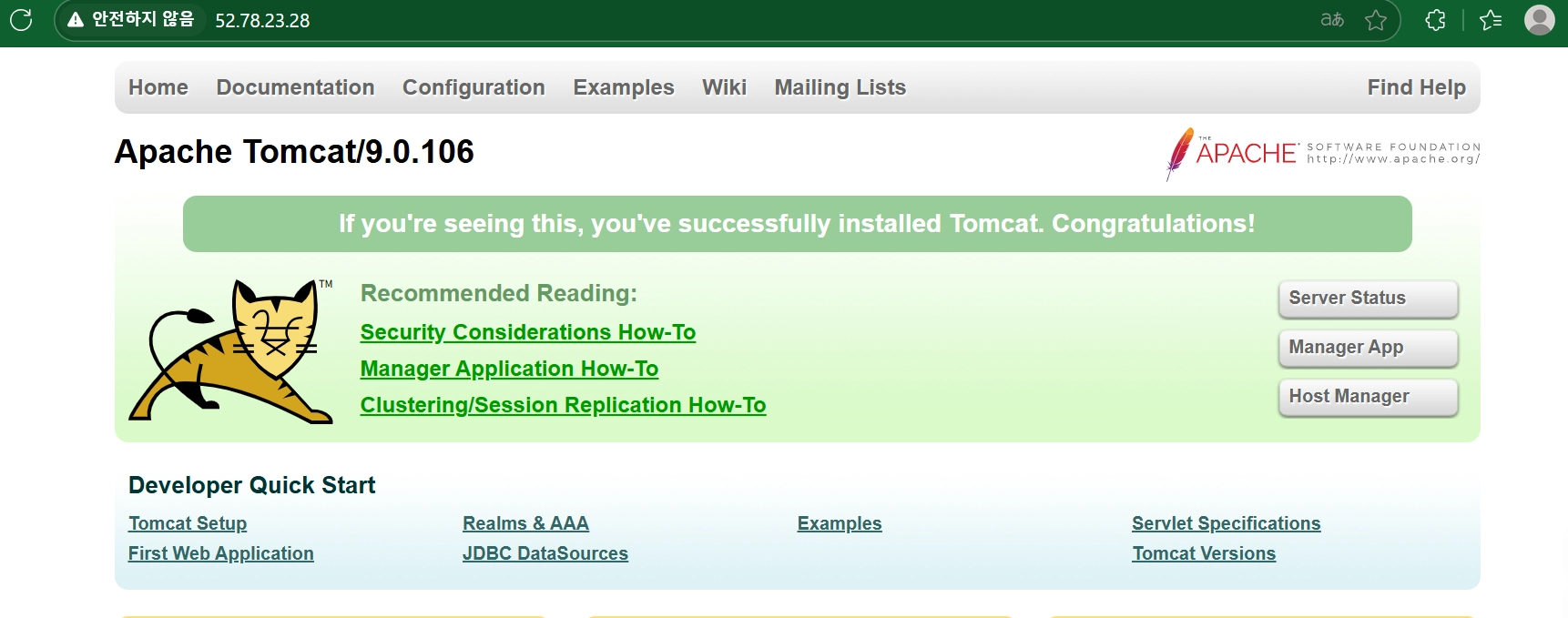
3.
이번에는 ALB DNS 정보를 통해서도 tomcat 야옹이 화면을 볼 수 있다.

4. Route53에 등록했던 각자 도메인으로 연결시 tomcat 야옹이 화면을 볼 수 있다.

07. tomcat 수정 (5개의 jsp 파일을 Bastion-Server에 생성한다.)
강사가 제공해 준 5개의 파일을 Bastion-Server 로 이동한다.
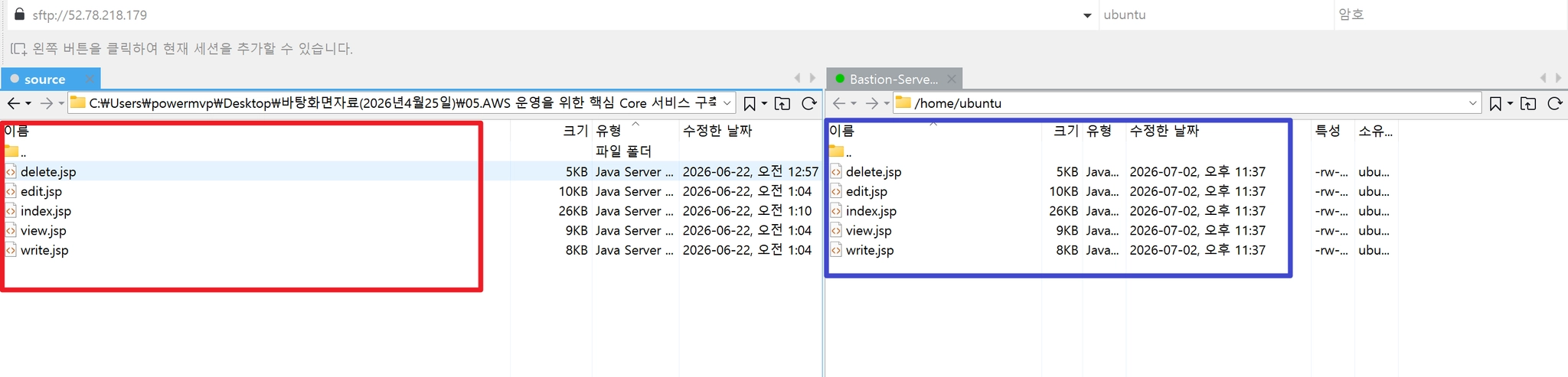
5개 jsp 파일을 Bastion-Server에 생성후 결과 화면

1. vi delete.jsp
<%@ page language="java" contentType="text/html; charset=UTF-8" pageEncoding="UTF-8"%>
<%@ page import="java.sql.*" %>
<%@ page import="javax.sql.*" %>
<%@ page import="javax.naming.*" %>
<%!
// 간단한 HTML 이스케이프 (XSS 방지)
private String esc(String s) {
if (s == null) return "";
return s.replace("&", "&").replace("<", "<")
.replace(">", ">").replace("\"", """);
}
%>
<%
// sypark(2026.06.22) delete.jsp - index.jsp 리스트의 삭제 링크(confirm 후 GET)로 호출됨
request.setCharacterEncoding("UTF-8");
response.setCharacterEncoding("UTF-8");
String idParam = request.getParameter("id");
int id = -1;
String errorMsg = null;
if (idParam == null) {
errorMsg = "잘못된 요청입니다. 게시글 번호가 없습니다.";
} else {
try {
id = Integer.parseInt(idParam);
} catch (Exception ex) {
errorMsg = "잘못된 게시글 번호입니다.";
}
}
if (errorMsg == null) {
Connection conn = null;
PreparedStatement pstmt = null;
try {
Context initContext = new InitialContext();
Context envContext = (Context) initContext.lookup("java:/comp/env");
DataSource ds = (DataSource) envContext.lookup("jdbc/MyDB");
conn = ds.getConnection();
String sql = "DELETE FROM posts WHERE id = ?";
pstmt = conn.prepareStatement(sql);
pstmt.setInt(1, id);
pstmt.executeUpdate();
response.sendRedirect("index.jsp");
return;
} catch (Exception e) {
errorMsg = "데이터베이스에 연결할 수 없습니다. (" + e.getMessage() + ")";
} finally {
if (pstmt != null) try { pstmt.close(); } catch (Exception e) {}
if (conn != null) try { conn.close(); } catch (Exception e) {}
}
}
%>
<!DOCTYPE html>
<html>
<head>
<meta charset="UTF-8">
<meta name="viewport" content="width=device-width, initial-scale=1.0">
<title>삭제 오류 - AWS 3Tier 실습</title>
<link rel="preconnect" href="https://fonts.googleapis.com">
<link rel="preconnect" href="https://fonts.gstatic.com" crossorigin>
<link href="https://fonts.googleapis.com/css2?family=Noto+Sans+KR:wght@400;500;600;700&display=swap" rel="stylesheet">
<style>
:root {
--accent: #3461ee;
--accent-hover: #2950d6;
--text-primary: #18181b;
--text-secondary: #6b7280;
--border: #e5e7eb;
--bg-page: #ffffff;
--bg-soft: #f9fafb;
--error-bg: #fef2f2;
--error-border: #fecaca;
--error-text: #b91c1c;
}
* { margin: 0; padding: 0; box-sizing: border-box; }
body {
font-family: 'Noto Sans KR', -apple-system, BlinkMacSystemFont, "Malgun Gothic", "맑은 고딕", sans-serif;
background: var(--bg-page);
color: var(--text-primary);
padding: 48px 24px 80px;
}
.wrap { max-width: 720px; margin: 0 auto; }
.page-header {
display: flex;
justify-content: space-between;
align-items: flex-start;
margin-bottom: 28px;
gap: 16px;
flex-wrap: wrap;
}
.page-title { font-size: 26px; font-weight: 700; margin-bottom: 6px; }
.page-subtitle { font-size: 14px; color: var(--text-secondary); }
.btn {
display: inline-flex;
align-items: center;
gap: 6px;
padding: 10px 18px;
border-radius: 8px;
font-size: 14px;
font-weight: 600;
text-decoration: none;
white-space: nowrap;
border: none;
cursor: pointer;
font-family: inherit;
transition: background .15s ease, border-color .15s ease;
}
.btn-primary { background: var(--accent); color: #fff; }
.btn-primary:hover { background: var(--accent-hover); }
.btn-secondary {
background: #fff;
color: var(--text-secondary);
border: 1px solid var(--border);
}
.btn-secondary:hover { background: var(--bg-soft); }
.form-error {
background: var(--error-bg);
border: 1px solid var(--error-border);
color: var(--error-text);
border-radius: 10px;
padding: 16px 20px;
margin-bottom: 20px;
font-size: 14px;
}
.empty-state {
text-align: center;
padding: 50px 20px;
border: 1px solid var(--border);
border-radius: 10px;
}
@media (max-width: 560px) {
body { padding: 28px 16px 60px; }
.page-title { font-size: 22px; }
}
</style>
</head>
<body>
<div class="wrap">
<div class="page-header">
<div>
<div class="page-title">삭제 오류</div>
<div class="page-subtitle">게시글을 삭제하는 중 문제가 발생했습니다.</div>
</div>
<a href="index.jsp" class="btn btn-secondary">목록으로</a>
</div>
<div class="form-error"><%= esc(errorMsg) %></div>
<div class="empty-state">
<a href="index.jsp" class="btn btn-primary">목록으로 돌아가기</a>
</div>
</div>
</body>
</html>
YAML
복사
2.
vi edit.jsp
<%@ page language="java" contentType="text/html; charset=UTF-8" pageEncoding="UTF-8"%>
<%@ page import="java.sql.*" %>
<%@ page import="javax.sql.*" %>
<%@ page import="javax.naming.*" %>
<%!
// 간단한 HTML 이스케이프 (XSS 방지)
private String esc(String s) {
if (s == null) return "";
return s.replace("&", "&").replace("<", "<")
.replace(">", ">").replace("\"", """);
}
%>
<%
// sypark(2026.06.22) edit.jsp - index.jsp/write.jsp와 동일한 UI 톤으로 작성
request.setCharacterEncoding("UTF-8");
response.setCharacterEncoding("UTF-8");
String idParam = request.getParameter("id");
int id = -1;
String title = request.getParameter("title");
String author = request.getParameter("author");
String content = request.getParameter("content");
boolean isPost = "POST".equalsIgnoreCase(request.getMethod());
String errorMsg = null;
boolean showForm = true;
if (idParam == null) {
errorMsg = "잘못된 접근입니다. 게시글 번호가 없습니다.";
showForm = false;
} else {
try {
id = Integer.parseInt(idParam);
} catch (Exception ex) {
errorMsg = "잘못된 게시글 번호입니다.";
showForm = false;
}
}
if (errorMsg == null && !isPost) {
// GET: 기존 게시글 내용을 폼에 채워서 보여줌
Connection conn = null;
PreparedStatement pstmt = null;
ResultSet rs = null;
try {
Context initContext = new InitialContext();
Context envContext = (Context) initContext.lookup("java:/comp/env");
DataSource ds = (DataSource) envContext.lookup("jdbc/MyDB");
conn = ds.getConnection();
String sql = "SELECT title, author, content FROM posts WHERE id = ?";
pstmt = conn.prepareStatement(sql);
pstmt.setInt(1, id);
rs = pstmt.executeQuery();
if (rs.next()) {
title = rs.getString("title");
author = rs.getString("author");
content = rs.getString("content");
} else {
errorMsg = "게시글을 찾을 수 없습니다.";
showForm = false;
}
} catch (Exception e) {
errorMsg = "데이터베이스에 연결할 수 없습니다. (" + e.getMessage() + ")";
showForm = false;
} finally {
if (rs != null) try { rs.close(); } catch (Exception e) {}
if (pstmt != null) try { pstmt.close(); } catch (Exception e) {}
if (conn != null) try { conn.close(); } catch (Exception e) {}
}
}
if (title == null) title = "";
if (author == null) author = "";
if (content == null) content = "";
if (errorMsg == null && isPost) {
title = title.trim();
author = author.trim();
content = content.trim();
if (title.isEmpty() || author.isEmpty() || content.isEmpty()) {
errorMsg = "제목, 작성자, 내용을 모두 입력해주세요.";
} else {
Connection conn = null;
PreparedStatement pstmt = null;
try {
Context initContext = new InitialContext();
Context envContext = (Context) initContext.lookup("java:/comp/env");
DataSource ds = (DataSource) envContext.lookup("jdbc/MyDB");
conn = ds.getConnection();
String sql = "UPDATE posts SET title = ?, author = ?, content = ? WHERE id = ?";
pstmt = conn.prepareStatement(sql);
pstmt.setString(1, title);
pstmt.setString(2, author);
pstmt.setString(3, content);
pstmt.setInt(4, id);
pstmt.executeUpdate();
response.sendRedirect("view.jsp?id=" + id);
return;
} catch (Exception e) {
errorMsg = "데이터베이스에 연결할 수 없습니다. (" + e.getMessage() + ")";
} finally {
if (pstmt != null) try { pstmt.close(); } catch (Exception e) {}
if (conn != null) try { conn.close(); } catch (Exception e) {}
}
}
}
String cancelHref = (id > 0) ? ("view.jsp?id=" + id) : "index.jsp";
%>
<!DOCTYPE html>
<html>
<head>
<meta charset="UTF-8">
<meta name="viewport" content="width=device-width, initial-scale=1.0">
<title>글 수정 - AWS 3Tier 실습</title>
<link rel="preconnect" href="https://fonts.googleapis.com">
<link rel="preconnect" href="https://fonts.gstatic.com" crossorigin>
<link href="https://fonts.googleapis.com/css2?family=Noto+Sans+KR:wght@400;500;600;700&display=swap" rel="stylesheet">
<style>
:root {
--accent: #ef5350;
--accent-hover: #e23e3b;
--text-primary: #18181b;
--text-secondary: #6b7280;
--text-muted: #9ca3af;
--border: #e5e7eb;
--bg-page: #ffffff;
--bg-soft: #f9fafb;
--error-bg: #fef2f2;
--error-border: #fecaca;
--error-text: #b91c1c;
}
* { margin: 0; padding: 0; box-sizing: border-box; }
body {
font-family: 'Noto Sans KR', -apple-system, BlinkMacSystemFont, "Malgun Gothic", "맑은 고딕", sans-serif;
background: var(--bg-page);
color: var(--text-primary);
padding: 48px 24px 80px;
}
.wrap { max-width: 720px; margin: 0 auto; }
.page-header {
display: flex;
justify-content: space-between;
align-items: flex-start;
margin-bottom: 28px;
gap: 16px;
flex-wrap: wrap;
}
.page-title { font-size: 26px; font-weight: 700; margin-bottom: 6px; }
.page-subtitle { font-size: 14px; color: var(--text-secondary); }
.btn {
display: inline-flex;
align-items: center;
gap: 6px;
padding: 10px 18px;
border-radius: 8px;
font-size: 14px;
font-weight: 600;
text-decoration: none;
white-space: nowrap;
border: none;
cursor: pointer;
font-family: inherit;
transition: background .15s ease, border-color .15s ease;
}
.btn-primary { background: var(--accent); color: #fff; }
.btn-primary:hover { background: var(--accent-hover); }
.btn-secondary {
background: #fff;
color: var(--text-secondary);
border: 1px solid var(--border);
}
.btn-secondary:hover { background: var(--bg-soft); }
.form-error {
background: var(--error-bg);
border: 1px solid var(--error-border);
color: var(--error-text);
border-radius: 10px;
padding: 16px 20px;
margin-bottom: 20px;
font-size: 14px;
}
.form-card {
border: 1px solid var(--border);
border-radius: 10px;
padding: 32px;
}
.field { margin-bottom: 22px; }
.field:last-of-type { margin-bottom: 0; }
.field label {
display: block;
font-size: 13px;
font-weight: 600;
color: var(--text-secondary);
margin-bottom: 8px;
}
.field label .required { color: var(--error-text); margin-left: 2px; }
.field input[type="text"],
.field textarea {
width: 100%;
border: 1px solid var(--border);
border-radius: 8px;
padding: 11px 14px;
font-size: 14px;
font-family: inherit;
color: var(--text-primary);
background: #fff;
}
.field input[type="text"]:focus,
.field textarea:focus {
outline: none;
border-color: var(--accent);
}
.field textarea {
resize: vertical;
min-height: 280px;
line-height: 1.6;
}
.row-half {
display: flex;
gap: 16px;
}
.row-half .field { flex: 1; }
.form-actions {
display: flex;
justify-content: flex-end;
gap: 8px;
margin-top: 28px;
padding-top: 24px;
border-top: 1px solid var(--border);
}
.empty-state {
text-align: center;
padding: 70px 20px;
color: var(--text-secondary);
border: 1px solid var(--border);
border-radius: 10px;
}
@media (max-width: 560px) {
body { padding: 28px 16px 60px; }
.page-title { font-size: 22px; }
.form-card { padding: 22px; }
.row-half { flex-direction: column; gap: 0; }
}
</style>
</head>
<body>
<div class="wrap">
<div class="page-header">
<div>
<div class="page-title">글 수정</div>
<div class="page-subtitle">게시글 내용을 수정합니다.</div>
</div>
<a href="index.jsp" class="btn btn-secondary">목록으로</a>
</div>
<% if (errorMsg != null) { %>
<div class="form-error"><%= esc(errorMsg) %></div>
<% } %>
<% if (showForm) { %>
<form class="form-card" action="edit.jsp" method="post">
<input type="hidden" name="id" value="<%= id %>">
<div class="row-half">
<div class="field">
<label for="author">작성자<span class="required">*</span></label>
<input type="text" id="author" name="author" value="<%= esc(author) %>" maxlength="50" placeholder="이름을 입력하세요" required>
</div>
</div>
<div class="field">
<label for="title">제목<span class="required">*</span></label>
<input type="text" id="title" name="title" value="<%= esc(title) %>" maxlength="200" placeholder="제목을 입력하세요" required>
</div>
<div class="field">
<label for="content">내용<span class="required">*</span></label>
<textarea id="content" name="content" placeholder="내용을 입력하세요" required><%= esc(content) %></textarea>
</div>
<div class="form-actions">
<a href="<%= cancelHref %>" class="btn btn-secondary">취소</a>
<button type="submit" class="btn btn-primary">수정 완료</button>
</div>
</form>
<% } else { %>
<div class="empty-state">
<a href="index.jsp" class="btn btn-primary">목록으로 돌아가기</a>
</div>
<% } %>
</div>
</body>
</html>
YAML
복사
3.
vi index.jsp
<%@ page language="java" contentType="text/html; charset=UTF-8" pageEncoding="UTF-8"%>
<%@ page import="java.sql.*" %>
<%@ page import="javax.sql.*" %>
<%@ page import="javax.naming.*" %>
<%@ page import="java.text.SimpleDateFormat" %>
<%@ page import="java.net.URLEncoder" %>
<%@ page import="java.net.InetAddress" %>
<%@ page import="java.util.List" %>
<%@ page import="java.util.ArrayList" %>
<%!
// 간단한 HTML 이스케이프 (XSS 방지)
private String esc(String s) {
if (s == null) return "";
return s.replace("&", "&").replace("<", "<")
.replace(">", ">").replace("\"", """);
}
// 작성자 아바타 (이니셜 + 고정 색상)
private static final String[] AVATAR_COLORS = {
"#f97066", "#fb923c", "#f59e0b", "#34d399", "#22d3ee", "#60a5fa", "#a78bfa", "#f472b6"
};
private String avatarColor(String name) {
if (name == null || name.isEmpty()) return AVATAR_COLORS[0];
int idx = Math.abs(name.hashCode()) % AVATAR_COLORS.length;
return AVATAR_COLORS[idx];
}
private String avatarInitial(String name) {
if (name == null || name.isEmpty()) return "?";
return name.substring(0, 1).toUpperCase();
}
%>
<%
// sypark(2026.06.22) index.jsp + list.jsp 통합 - 접속 시 바로 목록 표시
// sypark(2026.06.22) DB 조회를 HTML 출력 전으로 이동 - 사이드바 DB 상태 표시 위함
request.setCharacterEncoding("UTF-8");
response.setCharacterEncoding("UTF-8");
String q = request.getParameter("q");
if (q == null) q = "";
q = q.trim();
String sort = request.getParameter("sort");
if (sort == null || !sort.equals("old")) sort = "new";
int curPage = 1;
String pageParam = request.getParameter("page");
if (pageParam != null) {
try { curPage = Integer.parseInt(pageParam); } catch (Exception ex) { curPage = 1; }
}
if (curPage < 1) curPage = 1;
final int pageSize = 10;
int totalCount = 0;
int totalPages = 1;
boolean dbError = false;
String dbErrorMsg = "";
List<Object[]> postRows = new ArrayList<Object[]>(); // {id, title, author, created_at}
String qEncoded = "";
try { qEncoded = URLEncoder.encode(q, "UTF-8"); } catch (Exception ex) { qEncoded = ""; }
// 현재 접속(서비스) 서버 IP
String serverIp;
try {
serverIp = InetAddress.getLocalHost().getHostAddress();
} catch (Exception ex) {
serverIp = request.getServerName();
}
Connection conn = null;
PreparedStatement countStmt = null;
PreparedStatement listStmt = null;
ResultSet countRs = null;
ResultSet rs = null;
try {
Context initContext = new InitialContext();
Context envContext = (Context) initContext.lookup("java:/comp/env");
DataSource ds = (DataSource) envContext.lookup("jdbc/MyDB");
conn = ds.getConnection();
boolean hasSearch = !q.isEmpty();
String whereClause = hasSearch ? " WHERE (title LIKE ? OR content LIKE ? OR author LIKE ?)" : "";
String orderClause = "old".equals(sort) ? " ORDER BY created_at ASC" : " ORDER BY created_at DESC";
// 전체 건수 조회 (페이지네이션 계산용)
String countSql = "SELECT COUNT(*) AS cnt FROM posts" + whereClause;
countStmt = conn.prepareStatement(countSql);
if (hasSearch) {
countStmt.setString(1, "%" + q + "%");
countStmt.setString(2, "%" + q + "%");
countStmt.setString(3, "%" + q + "%");
}
countRs = countStmt.executeQuery();
if (countRs.next()) totalCount = countRs.getInt("cnt");
totalPages = (int) Math.ceil(totalCount / (double) pageSize);
if (totalPages < 1) totalPages = 1;
if (curPage > totalPages) curPage = totalPages;
int offset = (curPage - 1) * pageSize;
String listSql = "SELECT id, title, author, created_at FROM posts" + whereClause
+ orderClause + " LIMIT ? OFFSET ?";
listStmt = conn.prepareStatement(listSql);
int idx = 1;
if (hasSearch) {
listStmt.setString(idx++, "%" + q + "%");
listStmt.setString(idx++, "%" + q + "%");
listStmt.setString(idx++, "%" + q + "%");
}
listStmt.setInt(idx++, pageSize);
listStmt.setInt(idx++, offset);
rs = listStmt.executeQuery();
while (rs.next()) {
postRows.add(new Object[] {
rs.getInt("id"), rs.getString("title"), rs.getString("author"), rs.getTimestamp("created_at")
});
}
} catch (Exception e) {
dbError = true;
dbErrorMsg = e.getMessage();
} finally {
if (rs != null) try { rs.close(); } catch (Exception e) {}
if (countRs != null) try { countRs.close(); } catch (Exception e) {}
if (listStmt != null) try { listStmt.close(); } catch (Exception e) {}
if (countStmt != null) try { countStmt.close(); } catch (Exception e) {}
if (conn != null) try { conn.close(); } catch (Exception e) {}
}
%>
<!DOCTYPE html>
<html>
<head>
<meta charset="UTF-8">
<meta name="viewport" content="width=device-width, initial-scale=1.0">
<title>AWS 3Tier 실습</title>
<link rel="preconnect" href="https://fonts.googleapis.com">
<link rel="preconnect" href="https://fonts.gstatic.com" crossorigin>
<link href="https://fonts.googleapis.com/css2?family=Noto+Sans+KR:wght@400;500;600;700&display=swap" rel="stylesheet">
<style>
:root {
--accent: #ef5350;
--accent-hover: #e23e3b;
--text-primary: #18181b;
--text-secondary: #6b7280;
--text-muted: #9ca3af;
--border: #e5e7eb;
--border-light: #f1f3f5;
--bg-page: #ffffff;
--bg-soft: #f9fafb;
--error-bg: #fef2f2;
--error-border: #fecaca;
--error-text: #b91c1c;
--sidebar-from: #f3614f;
--sidebar-to: #e2493a;
--sidebar-text: rgba(255, 255, 255, .94);
--sidebar-text-dim: rgba(255, 255, 255, .68);
--sidebar-card-bg: rgba(255, 255, 255, .13);
--sidebar-card-border: rgba(255, 255, 255, .2);
}
* { margin: 0; padding: 0; box-sizing: border-box; }
html, body { height: 100%; }
body {
font-family: 'Noto Sans KR', -apple-system, BlinkMacSystemFont, "Malgun Gothic", "맑은 고딕", sans-serif;
background: var(--bg-page);
color: var(--text-primary);
display: flex;
align-items: stretch;
min-height: 100vh;
}
/* 좌측 사이드바 - 시스템 구조 설명 */
.sidebar {
width: 300px;
flex-shrink: 0;
background: linear-gradient(180deg, var(--sidebar-from) 0%, var(--sidebar-to) 100%);
color: var(--sidebar-text);
padding: 36px 28px;
display: flex;
flex-direction: column;
position: sticky;
top: 0;
height: 100vh;
overflow-y: auto;
}
.sidebar-brand {
font-size: 21px;
font-weight: 700;
margin-bottom: 22px;
letter-spacing: -.2px;
}
.sidebar-brand .dim { font-weight: 400; opacity: .8; }
.sidebar-intro {
font-size: 13px;
line-height: 1.65;
color: var(--sidebar-text-dim);
margin-bottom: 26px;
padding-bottom: 26px;
border-bottom: 1px solid rgba(255, 255, 255, .18);
}
.sidebar-heading {
font-size: 11px;
font-weight: 700;
letter-spacing: .06em;
text-transform: uppercase;
color: var(--sidebar-text-dim);
margin-bottom: 14px;
}
.tier-flow { display: flex; flex-direction: column; }
.tier-card {
background: var(--sidebar-card-bg);
border: 1px solid var(--sidebar-card-border);
border-radius: 10px;
padding: 13px 14px;
}
.tier-name {
font-size: 13px;
font-weight: 700;
margin-bottom: 3px;
}
.tier-tech {
font-size: 12px;
color: var(--sidebar-text-dim);
margin-bottom: 8px;
}
.tier-status {
display: inline-flex;
align-items: center;
gap: 5px;
font-size: 11px;
font-weight: 600;
color: var(--sidebar-text);
}
.tier-status .dot {
width: 6px;
height: 6px;
border-radius: 50%;
background: #4ade80;
display: inline-block;
}
.tier-card-error {
background: rgba(0, 0, 0, .15);
border-color: rgba(251, 191, 36, .55);
}
.tier-status.status-error { color: #fde68a; }
.tier-status .dot-error {
background: #fbbf24;
box-shadow: 0 0 0 3px rgba(251, 191, 36, .25);
}
.tier-arrow {
text-align: center;
font-size: 14px;
color: var(--sidebar-text-dim);
padding: 4px 0;
}
.sidebar-flow-desc {
font-size: 12.5px;
line-height: 1.7;
color: var(--sidebar-text-dim);
margin-top: 18px;
}
.sidebar-footer {
margin-top: auto;
padding-top: 20px;
border-top: 1px solid rgba(255, 255, 255, .18);
font-size: 11.5px;
line-height: 1.7;
color: var(--sidebar-text-dim);
}
/* 메인 영역 */
.main { flex: 1; min-width: 0; padding: 48px 40px 80px; }
.wrap { max-width: 1000px; margin: 0 auto; }
/* 헤더 */
.page-header {
display: flex;
justify-content: space-between;
align-items: flex-start;
margin-bottom: 28px;
gap: 16px;
flex-wrap: wrap;
}
.page-title { font-size: 26px; font-weight: 700; margin-bottom: 6px; }
.page-subtitle { font-size: 14px; color: var(--text-secondary); }
.btn-write {
display: inline-flex;
align-items: center;
gap: 6px;
background: var(--accent);
color: #fff;
padding: 10px 18px;
border-radius: 8px;
font-size: 14px;
font-weight: 600;
text-decoration: none;
white-space: nowrap;
transition: background .15s ease;
}
.btn-write:hover { background: var(--accent-hover); }
.btn-write svg { width: 15px; height: 15px; }
/* 검색바 */
.toolbar {
display: flex;
gap: 10px;
margin-bottom: 18px;
flex-wrap: wrap;
}
.select-cat,
.select-sort,
.search-input {
border: 1px solid var(--border);
border-radius: 8px;
padding: 10px 14px;
font-size: 14px;
font-family: inherit;
color: var(--text-primary);
background: #fff;
}
.select-cat, .select-sort { min-width: 110px; cursor: pointer; }
.select-sort:focus { outline: none; border-color: var(--accent); }
.search-form {
display: flex;
gap: 8px;
flex: 1;
min-width: 240px;
}
.search-input { flex: 1; }
.search-input:focus,
.select-cat:focus { outline: none; border-color: var(--accent); }
.btn-search {
display: inline-flex;
align-items: center;
justify-content: center;
width: 42px;
border: 1px solid var(--border);
border-radius: 8px;
background: #fff;
cursor: pointer;
transition: background .15s ease;
}
.btn-search:hover { background: var(--bg-soft); }
.btn-search svg { width: 17px; height: 17px; stroke: var(--text-secondary); }
/* 에러 배너 */
.db-error {
background: var(--error-bg);
border: 1px solid var(--error-border);
color: var(--error-text);
border-radius: 10px;
padding: 22px 24px;
margin-top: 8px;
}
.db-error .title { font-weight: 700; font-size: 16px; margin-bottom: 6px; }
.db-error .desc { font-size: 13px; color: #991b1b; line-height: 1.6; word-break: break-all; }
/* 테이블 */
.table-wrap {
border: 1px solid var(--border);
border-radius: 10px;
overflow-x: auto;
}
table { width: 100%; border-collapse: collapse; min-width: 640px; }
thead th {
background: var(--bg-soft);
color: var(--text-secondary);
font-size: 13px;
font-weight: 600;
text-align: center;
padding: 14px 10px;
border-bottom: 1px solid var(--border);
white-space: nowrap;
}
th.col-title, td.col-title, th.col-author { text-align: left; }
tbody td {
padding: 14px 10px;
font-size: 14px;
text-align: center;
border-bottom: 1px solid var(--border-light);
color: var(--text-primary);
}
tbody tr:last-child td { border-bottom: none; }
tbody tr:hover { background: var(--bg-soft); }
td.col-no { color: var(--text-muted); width: 60px; }
td.col-title {
max-width: 0;
width: 100%;
overflow: hidden;
text-overflow: ellipsis;
white-space: nowrap;
}
td.col-title a {
color: var(--text-primary);
text-decoration: none;
font-weight: 500;
}
td.col-title a:hover { color: var(--accent); text-decoration: underline; }
td.col-author {
width: 150px;
color: var(--text-secondary);
text-align: left;
}
.author-cell {
display: inline-flex;
align-items: center;
gap: 8px;
max-width: 100%;
}
.author-name {
white-space: nowrap;
overflow: hidden;
text-overflow: ellipsis;
}
.avatar {
display: inline-flex;
align-items: center;
justify-content: center;
width: 24px;
height: 24px;
flex-shrink: 0;
border-radius: 50%;
color: #fff;
font-size: 11px;
font-weight: 700;
}
td.col-date { width: 110px; color: var(--text-secondary); font-size: 13px; }
td.col-manage { width: 120px; font-size: 13px; white-space: nowrap; }
td.col-manage a {
color: var(--text-muted);
text-decoration: none;
}
td.col-manage a:hover { color: var(--accent); text-decoration: underline; }
td.col-manage a.del:hover { color: #d92d20; }
td.col-manage .sep { color: var(--border); margin: 0 6px; }
/* 빈 상태 */
.empty-state {
text-align: center;
padding: 70px 20px;
color: var(--text-secondary);
}
.empty-state .title { font-size: 16px; font-weight: 600; color: var(--text-primary); margin-bottom: 6px; }
.empty-state .desc { font-size: 13px; }
/* 페이지네이션 */
.pagination {
display: flex;
justify-content: center;
align-items: center;
gap: 4px;
margin-top: 28px;
}
.pagination a, .pagination span {
display: inline-flex;
align-items: center;
justify-content: center;
min-width: 32px;
height: 32px;
padding: 0 6px;
border-radius: 7px;
font-size: 13px;
text-decoration: none;
color: var(--text-secondary);
}
.pagination a:hover { background: var(--bg-soft); }
.pagination .current {
background: var(--accent);
color: #fff;
font-weight: 600;
}
.pagination .ellipsis { color: var(--text-muted); }
.pagination .nav-arrow { color: var(--text-muted); }
.pagination .nav-arrow.disabled { opacity: .35; pointer-events: none; }
@media (max-width: 860px) {
body { flex-direction: column; }
.sidebar {
width: 100%;
height: auto;
position: static;
padding: 28px 24px;
}
.tier-flow { flex-direction: row; gap: 10px; overflow-x: auto; }
.tier-arrow { display: none; }
.sidebar-flow-desc { display: none; }
}
@media (max-width: 560px) {
.main { padding: 28px 16px 60px; }
.page-title { font-size: 22px; }
}
</style>
</head>
<body>
<aside class="sidebar">
<div class="sidebar-brand">3Tier<span class="dim"> Board</span></div>
<div class="sidebar-intro">
AWS 3-Tier 아키텍처 실습용으로 만든 게시판입니다.
아래는 이 서비스가 실제로 어떤 구조로 요청을 처리하는지 보여줍니다.
</div>
<div class="sidebar-heading">시스템 아키텍처</div>
<div class="tier-flow">
<div class="tier-card">
<div class="tier-name">Web Tier</div>
<div class="tier-tech">Nginx</div>
<div class="tier-status"><span class="dot"></span>정상 동작</div>
</div>
<div class="tier-arrow">↓</div>
<div class="tier-card">
<div class="tier-name">Application Tier</div>
<div class="tier-tech">Apache Tomcat 9.0</div>
<div class="tier-status"><span class="dot"></span>정상 동작</div>
</div>
<div class="tier-arrow">↓</div>
<div class="tier-card<%= dbError ? " tier-card-error" : "" %>">
<div class="tier-name">Database Tier</div>
<div class="tier-tech">AWS RDS MySQL</div>
<div class="tier-status<%= dbError ? " status-error" : "" %>">
<span class="dot<%= dbError ? " dot-error" : "" %>"></span><%= dbError ? "연결 안됨" : "연결됨" %>
</div>
</div>
</div>
<div class="sidebar-flow-desc">
클라이언트 요청은 Nginx가 받아 Tomcat으로 전달하고, Tomcat은 비즈니스 로직을 처리한 뒤
AWS RDS MySQL과 통신해 데이터를 저장하고 조회합니다.
</div>
<div class="sidebar-footer">
접속서버: <%= serverIp %><br>
<%= request.getServerName() %>:<%= request.getServerPort() %><br>
<%= new java.text.SimpleDateFormat("yyyy.MM.dd HH:mm").format(new java.util.Date()) %> 기준
</div>
</aside>
<main class="main">
<div class="wrap">
<div class="page-header">
<div>
<div class="page-title">AWS 3Tier 실습</div>
<div class="page-subtitle">AWS 3Tier 아키텍처 실습 관련 게시판입니다. 실습 과정, 문제 해결, 공유 등을 자유롭게 게시해주세요.</div>
</div>
<a href="write.jsp" class="btn-write">
<svg viewBox="0 0 24 24" fill="none" stroke="currentColor" stroke-width="2" stroke-linecap="round" stroke-linejoin="round"><path d="M12 20h9"/><path d="M16.5 3.5a2.12 2.12 0 0 1 3 3L7 19l-4 1 1-4Z"/></svg>
글쓰기
</a>
</div>
<form class="toolbar" action="index.jsp" method="get">
<select class="select-cat" disabled>
<option>전체 게시글</option>
</select>
<select class="select-sort" name="sort" onchange="this.form.submit()">
<option value="new" <%= "new".equals(sort) ? "selected" : "" %>>최신순</option>
<option value="old" <%= "old".equals(sort) ? "selected" : "" %>>오래된순</option>
</select>
<div class="search-form">
<input
type="text"
name="q"
class="search-input"
placeholder="제목, 내용, 작성자 검색..."
value="<%= esc(q) %>"
/>
<button type="submit" class="btn-search" aria-label="검색">
<svg viewBox="0 0 24 24" fill="none" stroke-width="2" stroke-linecap="round"><circle cx="11" cy="11" r="7"/><path d="m21 21-4.3-4.3"/></svg>
</button>
</div>
</form>
<% if (dbError) { %>
<div class="db-error">
<div class="title">데이터베이스에 연결할 수 없습니다</div>
<div class="desc"><%= esc(dbErrorMsg) %></div>
</div>
<% } else { %>
<div class="table-wrap">
<table>
<thead>
<tr>
<th style="width:60px;">번호</th>
<th class="col-title">제목</th>
<th style="width:150px;" class="col-author">작성자</th>
<th style="width:110px;">작성일</th>
<th style="width:120px;">관리</th>
</tr>
</thead>
<tbody>
<%
SimpleDateFormat sdf = new SimpleDateFormat("yyyy.MM.dd");
for (Object[] row : postRows) {
int id = (Integer) row[0];
String rawAuthor = (String) row[2];
String title = esc((String) row[1]);
String author = esc(rawAuthor);
java.sql.Timestamp ts = (java.sql.Timestamp) row[3];
String dateStr = ts != null ? sdf.format(ts) : "-";
%>
<tr>
<td class="col-no"><%= id %></td>
<td class="col-title" title="<%= title %>">
<a href="view.jsp?id=<%= id %>"><%= title %></a>
</td>
<td class="col-author">
<span class="author-cell">
<span class="avatar" style="background:<%= avatarColor(rawAuthor) %>;"><%= esc(avatarInitial(rawAuthor)) %></span>
<span class="author-name"><%= author %></span>
</span>
</td>
<td class="col-date"><%= dateStr %></td>
<td class="col-manage">
<a href="edit.jsp?id=<%= id %>">수정</a><span class="sep">|</span><a href="delete.jsp?id=<%= id %>" class="del" onclick="return confirm('정말 삭제하시겠습니까?')">삭제</a>
</td>
</tr>
<%
}
if (postRows.isEmpty()) {
%>
<tr>
<td colspan="5">
<div class="empty-state">
<div class="title"><%= q.isEmpty() ? "게시글이 없습니다" : "검색 결과가 없습니다" %></div>
<div class="desc">
<% if (q.isEmpty()) { %>
첫 번째 게시글을 작성해보세요.
<% } else { %>
'<%= esc(q) %>'에 대한 검색 결과를 찾을 수 없습니다.
<% } %>
</div>
</div>
</td>
</tr>
<%
}
%>
</tbody>
</table>
</div>
<%
if (totalPages > 1) {
int windowStart, windowEnd;
if (totalPages <= 7) {
windowStart = 1; windowEnd = totalPages;
} else if (curPage <= 4) {
windowStart = 1; windowEnd = 5;
} else if (curPage >= totalPages - 3) {
windowStart = totalPages - 4; windowEnd = totalPages;
} else {
windowStart = curPage - 2; windowEnd = curPage + 2;
}
String qSuffix = q.isEmpty() ? "" : ("&q=" + qEncoded);
qSuffix += "old".equals(sort) ? "&sort=old" : "";
%>
<div class="pagination">
<a class="nav-arrow<%= curPage <= 1 ? " disabled" : "" %>" href="index.jsp?page=1<%= qSuffix %>">«</a>
<a class="nav-arrow<%= curPage <= 1 ? " disabled" : "" %>" href="index.jsp?page=<%= curPage - 1 %><%= qSuffix %>">‹</a>
<%
if (windowStart > 1) {
%>
<a href="index.jsp?page=1<%= qSuffix %>">1</a>
<% if (windowStart > 2) { %><span class="ellipsis">…</span><% } %>
<%
}
for (int p = windowStart; p <= windowEnd; p++) {
if (p == curPage) {
%>
<span class="current"><%= p %></span>
<%
} else {
%>
<a href="index.jsp?page=<%= p %><%= qSuffix %>"><%= p %></a>
<%
}
}
if (windowEnd < totalPages) {
if (windowEnd < totalPages - 1) {
%>
<span class="ellipsis">…</span>
<%
}
%>
<a href="index.jsp?page=<%= totalPages %><%= qSuffix %>"><%= totalPages %></a>
<%
}
%>
<a class="nav-arrow<%= curPage >= totalPages ? " disabled" : "" %>" href="index.jsp?page=<%= curPage + 1 %><%= qSuffix %>">›</a>
</div>
<%
}
%>
<% } %>
</div>
</main>
</body>
</html>
YAML
복사
4.
vi view.jsp
<%@ page language="java" contentType="text/html; charset=UTF-8" pageEncoding="UTF-8"%>
<%@ page import="java.sql.*" %>
<%@ page import="javax.sql.*" %>
<%@ page import="javax.naming.*" %>
<%@ page import="java.text.SimpleDateFormat" %>
<%@ page import="java.net.URLEncoder" %>
<%@ page import="java.net.InetAddress" %>
<%@ page import="java.util.List" %>
<%@ page import="java.util.ArrayList" %>
<%!
// 간단한 HTML 이스케이프 (XSS 방지)
private String esc(String s) {
if (s == null) return "";
return s.replace("&", "&").replace("<", "<")
.replace(">", ">").replace("\"", """);
}
// 작성자 아바타 (이니셜 + 고정 색상)
private static final String[] AVATAR_COLORS = {
"#f97066", "#fb923c", "#f59e0b", "#34d399", "#22d3ee", "#60a5fa", "#a78bfa", "#f472b6"
};
private String avatarColor(String name) {
if (name == null || name.isEmpty()) return AVATAR_COLORS[0];
int idx = Math.abs(name.hashCode()) % AVATAR_COLORS.length;
return AVATAR_COLORS[idx];
}
private String avatarInitial(String name) {
if (name == null || name.isEmpty()) return "?";
return name.substring(0, 1).toUpperCase();
}
%>
<%
// sypark(2026.06.22) index.jsp + list.jsp 통합 - 접속 시 바로 목록 표시
// sypark(2026.06.22) DB 조회를 HTML 출력 전으로 이동 - 사이드바 DB 상태 표시 위함
request.setCharacterEncoding("UTF-8");
response.setCharacterEncoding("UTF-8");
String q = request.getParameter("q");
if (q == null) q = "";
q = q.trim();
String sort = request.getParameter("sort");
if (sort == null || !sort.equals("old")) sort = "new";
int curPage = 1;
String pageParam = request.getParameter("page");
if (pageParam != null) {
try { curPage = Integer.parseInt(pageParam); } catch (Exception ex) { curPage = 1; }
}
if (curPage < 1) curPage = 1;
final int pageSize = 10;
int totalCount = 0;
int totalPages = 1;
boolean dbError = false;
String dbErrorMsg = "";
List<Object[]> postRows = new ArrayList<Object[]>(); // {id, title, author, created_at}
String qEncoded = "";
try { qEncoded = URLEncoder.encode(q, "UTF-8"); } catch (Exception ex) { qEncoded = ""; }
// 현재 접속(서비스) 서버 IP
String serverIp;
try {
serverIp = InetAddress.getLocalHost().getHostAddress();
} catch (Exception ex) {
serverIp = request.getServerName();
}
Connection conn = null;
PreparedStatement countStmt = null;
PreparedStatement listStmt = null;
ResultSet countRs = null;
ResultSet rs = null;
try {
Context initContext = new InitialContext();
Context envContext = (Context) initContext.lookup("java:/comp/env");
DataSource ds = (DataSource) envContext.lookup("jdbc/MyDB");
conn = ds.getConnection();
boolean hasSearch = !q.isEmpty();
String whereClause = hasSearch ? " WHERE (title LIKE ? OR content LIKE ? OR author LIKE ?)" : "";
String orderClause = "old".equals(sort) ? " ORDER BY created_at ASC" : " ORDER BY created_at DESC";
// 전체 건수 조회 (페이지네이션 계산용)
String countSql = "SELECT COUNT(*) AS cnt FROM posts" + whereClause;
countStmt = conn.prepareStatement(countSql);
if (hasSearch) {
countStmt.setString(1, "%" + q + "%");
countStmt.setString(2, "%" + q + "%");
countStmt.setString(3, "%" + q + "%");
}
countRs = countStmt.executeQuery();
if (countRs.next()) totalCount = countRs.getInt("cnt");
totalPages = (int) Math.ceil(totalCount / (double) pageSize);
if (totalPages < 1) totalPages = 1;
if (curPage > totalPages) curPage = totalPages;
int offset = (curPage - 1) * pageSize;
String listSql = "SELECT id, title, author, created_at FROM posts" + whereClause
+ orderClause + " LIMIT ? OFFSET ?";
listStmt = conn.prepareStatement(listSql);
int idx = 1;
if (hasSearch) {
listStmt.setString(idx++, "%" + q + "%");
listStmt.setString(idx++, "%" + q + "%");
listStmt.setString(idx++, "%" + q + "%");
}
listStmt.setInt(idx++, pageSize);
listStmt.setInt(idx++, offset);
rs = listStmt.executeQuery();
while (rs.next()) {
postRows.add(new Object[] {
rs.getInt("id"), rs.getString("title"), rs.getString("author"), rs.getTimestamp("created_at")
});
}
} catch (Exception e) {
dbError = true;
dbErrorMsg = e.getMessage();
} finally {
if (rs != null) try { rs.close(); } catch (Exception e) {}
if (countRs != null) try { countRs.close(); } catch (Exception e) {}
if (listStmt != null) try { listStmt.close(); } catch (Exception e) {}
if (countStmt != null) try { countStmt.close(); } catch (Exception e) {}
if (conn != null) try { conn.close(); } catch (Exception e) {}
}
%>
<!DOCTYPE html>
<html>
<head>
<meta charset="UTF-8">
<meta name="viewport" content="width=device-width, initial-scale=1.0">
<title>AWS 3Tier 실습</title>
<link rel="preconnect" href="https://fonts.googleapis.com">
<link rel="preconnect" href="https://fonts.gstatic.com" crossorigin>
<link href="https://fonts.googleapis.com/css2?family=Noto+Sans+KR:wght@400;500;600;700&display=swap" rel="stylesheet">
<style>
:root {
--accent: #ef5350;
--accent-hover: #e23e3b;
--text-primary: #18181b;
--text-secondary: #6b7280;
--text-muted: #9ca3af;
--border: #e5e7eb;
--border-light: #f1f3f5;
--bg-page: #ffffff;
--bg-soft: #f9fafb;
--error-bg: #fef2f2;
--error-border: #fecaca;
--error-text: #b91c1c;
--sidebar-from: #f3614f;
--sidebar-to: #e2493a;
--sidebar-text: rgba(255, 255, 255, .94);
--sidebar-text-dim: rgba(255, 255, 255, .68);
--sidebar-card-bg: rgba(255, 255, 255, .13);
--sidebar-card-border: rgba(255, 255, 255, .2);
}
* { margin: 0; padding: 0; box-sizing: border-box; }
html, body { height: 100%; }
body {
font-family: 'Noto Sans KR', -apple-system, BlinkMacSystemFont, "Malgun Gothic", "맑은 고딕", sans-serif;
background: var(--bg-page);
color: var(--text-primary);
display: flex;
align-items: stretch;
min-height: 100vh;
}
/* 좌측 사이드바 - 시스템 구조 설명 */
.sidebar {
width: 300px;
flex-shrink: 0;
background: linear-gradient(180deg, var(--sidebar-from) 0%, var(--sidebar-to) 100%);
color: var(--sidebar-text);
padding: 36px 28px;
display: flex;
flex-direction: column;
position: sticky;
top: 0;
height: 100vh;
overflow-y: auto;
}
.sidebar-brand {
font-size: 21px;
font-weight: 700;
margin-bottom: 22px;
letter-spacing: -.2px;
}
.sidebar-brand .dim { font-weight: 400; opacity: .8; }
.sidebar-intro {
font-size: 13px;
line-height: 1.65;
color: var(--sidebar-text-dim);
margin-bottom: 26px;
padding-bottom: 26px;
border-bottom: 1px solid rgba(255, 255, 255, .18);
}
.sidebar-heading {
font-size: 11px;
font-weight: 700;
letter-spacing: .06em;
text-transform: uppercase;
color: var(--sidebar-text-dim);
margin-bottom: 14px;
}
.tier-flow { display: flex; flex-direction: column; }
.tier-card {
background: var(--sidebar-card-bg);
border: 1px solid var(--sidebar-card-border);
border-radius: 10px;
padding: 13px 14px;
}
.tier-name {
font-size: 13px;
font-weight: 700;
margin-bottom: 3px;
}
.tier-tech {
font-size: 12px;
color: var(--sidebar-text-dim);
margin-bottom: 8px;
}
.tier-status {
display: inline-flex;
align-items: center;
gap: 5px;
font-size: 11px;
font-weight: 600;
color: var(--sidebar-text);
}
.tier-status .dot {
width: 6px;
height: 6px;
border-radius: 50%;
background: #4ade80;
display: inline-block;
}
.tier-card-error {
background: rgba(0, 0, 0, .15);
border-color: rgba(251, 191, 36, .55);
}
.tier-status.status-error { color: #fde68a; }
.tier-status .dot-error {
background: #fbbf24;
box-shadow: 0 0 0 3px rgba(251, 191, 36, .25);
}
.tier-arrow {
text-align: center;
font-size: 14px;
color: var(--sidebar-text-dim);
padding: 4px 0;
}
.sidebar-flow-desc {
font-size: 12.5px;
line-height: 1.7;
color: var(--sidebar-text-dim);
margin-top: 18px;
}
.sidebar-footer {
margin-top: auto;
padding-top: 20px;
border-top: 1px solid rgba(255, 255, 255, .18);
font-size: 11.5px;
line-height: 1.7;
color: var(--sidebar-text-dim);
}
/* 메인 영역 */
.main { flex: 1; min-width: 0; padding: 48px 40px 80px; }
.wrap { max-width: 1000px; margin: 0 auto; }
/* 헤더 */
.page-header {
display: flex;
justify-content: space-between;
align-items: flex-start;
margin-bottom: 28px;
gap: 16px;
flex-wrap: wrap;
}
.page-title { font-size: 26px; font-weight: 700; margin-bottom: 6px; }
.page-subtitle { font-size: 14px; color: var(--text-secondary); }
.btn-write {
display: inline-flex;
align-items: center;
gap: 6px;
background: var(--accent);
color: #fff;
padding: 10px 18px;
border-radius: 8px;
font-size: 14px;
font-weight: 600;
text-decoration: none;
white-space: nowrap;
transition: background .15s ease;
}
.btn-write:hover { background: var(--accent-hover); }
.btn-write svg { width: 15px; height: 15px; }
/* 검색바 */
.toolbar {
display: flex;
gap: 10px;
margin-bottom: 18px;
flex-wrap: wrap;
}
.select-cat,
.select-sort,
.search-input {
border: 1px solid var(--border);
border-radius: 8px;
padding: 10px 14px;
font-size: 14px;
font-family: inherit;
color: var(--text-primary);
background: #fff;
}
.select-cat, .select-sort { min-width: 110px; cursor: pointer; }
.select-sort:focus { outline: none; border-color: var(--accent); }
.search-form {
display: flex;
gap: 8px;
flex: 1;
min-width: 240px;
}
.search-input { flex: 1; }
.search-input:focus,
.select-cat:focus { outline: none; border-color: var(--accent); }
.btn-search {
display: inline-flex;
align-items: center;
justify-content: center;
width: 42px;
border: 1px solid var(--border);
border-radius: 8px;
background: #fff;
cursor: pointer;
transition: background .15s ease;
}
.btn-search:hover { background: var(--bg-soft); }
.btn-search svg { width: 17px; height: 17px; stroke: var(--text-secondary); }
/* 에러 배너 */
.db-error {
background: var(--error-bg);
border: 1px solid var(--error-border);
color: var(--error-text);
border-radius: 10px;
padding: 22px 24px;
margin-top: 8px;
}
.db-error .title { font-weight: 700; font-size: 16px; margin-bottom: 6px; }
.db-error .desc { font-size: 13px; color: #991b1b; line-height: 1.6; word-break: break-all; }
/* 테이블 */
.table-wrap {
border: 1px solid var(--border);
border-radius: 10px;
overflow-x: auto;
}
table { width: 100%; border-collapse: collapse; min-width: 640px; }
thead th {
background: var(--bg-soft);
color: var(--text-secondary);
font-size: 13px;
font-weight: 600;
text-align: center;
padding: 14px 10px;
border-bottom: 1px solid var(--border);
white-space: nowrap;
}
th.col-title, td.col-title, th.col-author { text-align: left; }
tbody td {
padding: 14px 10px;
font-size: 14px;
text-align: center;
border-bottom: 1px solid var(--border-light);
color: var(--text-primary);
}
tbody tr:last-child td { border-bottom: none; }
tbody tr:hover { background: var(--bg-soft); }
td.col-no { color: var(--text-muted); width: 60px; }
td.col-title {
max-width: 0;
width: 100%;
overflow: hidden;
text-overflow: ellipsis;
white-space: nowrap;
}
td.col-title a {
color: var(--text-primary);
text-decoration: none;
font-weight: 500;
}
td.col-title a:hover { color: var(--accent); text-decoration: underline; }
td.col-author {
width: 150px;
color: var(--text-secondary);
text-align: left;
}
.author-cell {
display: inline-flex;
align-items: center;
gap: 8px;
max-width: 100%;
}
.author-name {
white-space: nowrap;
overflow: hidden;
text-overflow: ellipsis;
}
.avatar {
display: inline-flex;
align-items: center;
justify-content: center;
width: 24px;
height: 24px;
flex-shrink: 0;
border-radius: 50%;
color: #fff;
font-size: 11px;
font-weight: 700;
}
td.col-date { width: 110px; color: var(--text-secondary); font-size: 13px; }
td.col-manage { width: 120px; font-size: 13px; white-space: nowrap; }
td.col-manage a {
color: var(--text-muted);
text-decoration: none;
}
td.col-manage a:hover { color: var(--accent); text-decoration: underline; }
td.col-manage a.del:hover { color: #d92d20; }
td.col-manage .sep { color: var(--border); margin: 0 6px; }
/* 빈 상태 */
.empty-state {
text-align: center;
padding: 70px 20px;
color: var(--text-secondary);
}
.empty-state .title { font-size: 16px; font-weight: 600; color: var(--text-primary); margin-bottom: 6px; }
.empty-state .desc { font-size: 13px; }
/* 페이지네이션 */
.pagination {
display: flex;
justify-content: center;
align-items: center;
gap: 4px;
margin-top: 28px;
}
.pagination a, .pagination span {
display: inline-flex;
align-items: center;
justify-content: center;
min-width: 32px;
height: 32px;
padding: 0 6px;
border-radius: 7px;
font-size: 13px;
text-decoration: none;
color: var(--text-secondary);
}
.pagination a:hover { background: var(--bg-soft); }
.pagination .current {
background: var(--accent);
color: #fff;
font-weight: 600;
}
.pagination .ellipsis { color: var(--text-muted); }
.pagination .nav-arrow { color: var(--text-muted); }
.pagination .nav-arrow.disabled { opacity: .35; pointer-events: none; }
@media (max-width: 860px) {
body { flex-direction: column; }
.sidebar {
width: 100%;
height: auto;
position: static;
padding: 28px 24px;
}
.tier-flow { flex-direction: row; gap: 10px; overflow-x: auto; }
.tier-arrow { display: none; }
.sidebar-flow-desc { display: none; }
}
@media (max-width: 560px) {
.main { padding: 28px 16px 60px; }
.page-title { font-size: 22px; }
}
</style>
</head>
<body>
<aside class="sidebar">
<div class="sidebar-brand">3Tier<span class="dim"> Board</span></div>
<div class="sidebar-intro">
AWS 3-Tier 아키텍처 실습용으로 만든 게시판입니다.
아래는 이 서비스가 실제로 어떤 구조로 요청을 처리하는지 보여줍니다.
</div>
<div class="sidebar-heading">시스템 아키텍처</div>
<div class="tier-flow">
<div class="tier-card">
<div class="tier-name">Web Tier</div>
<div class="tier-tech">Nginx</div>
<div class="tier-status"><span class="dot"></span>정상 동작</div>
</div>
<div class="tier-arrow">↓</div>
<div class="tier-card">
<div class="tier-name">Application Tier</div>
<div class="tier-tech">Apache Tomcat 9.0</div>
<div class="tier-status"><span class="dot"></span>정상 동작</div>
</div>
<div class="tier-arrow">↓</div>
<div class="tier-card<%= dbError ? " tier-card-error" : "" %>">
<div class="tier-name">Database Tier</div>
<div class="tier-tech">AWS RDS MySQL</div>
<div class="tier-status<%= dbError ? " status-error" : "" %>">
<span class="dot<%= dbError ? " dot-error" : "" %>"></span><%= dbError ? "연결 안됨" : "연결됨" %>
</div>
</div>
</div>
<div class="sidebar-flow-desc">
클라이언트 요청은 Nginx가 받아 Tomcat으로 전달하고, Tomcat은 비즈니스 로직을 처리한 뒤
AWS RDS MySQL과 통신해 데이터를 저장하고 조회합니다.
</div>
<div class="sidebar-footer">
접속서버: <%= serverIp %><br>
<%= request.getServerName() %>:<%= request.getServerPort() %><br>
<%= new java.text.SimpleDateFormat("yyyy.MM.dd HH:mm").format(new java.util.Date()) %> 기준
</div>
</aside>
<main class="main">
<div class="wrap">
<div class="page-header">
<div>
<div class="page-title">AWS 3Tier 실습</div>
<div class="page-subtitle">AWS 3Tier 아키텍처 실습 관련 게시판입니다. 실습 과정, 문제 해결, 공유 등을 자유롭게 게시해주세요.</div>
</div>
<a href="write.jsp" class="btn-write">
<svg viewBox="0 0 24 24" fill="none" stroke="currentColor" stroke-width="2" stroke-linecap="round" stroke-linejoin="round"><path d="M12 20h9"/><path d="M16.5 3.5a2.12 2.12 0 0 1 3 3L7 19l-4 1 1-4Z"/></svg>
글쓰기
</a>
</div>
<form class="toolbar" action="index.jsp" method="get">
<select class="select-cat" disabled>
<option>전체 게시글</option>
</select>
<select class="select-sort" name="sort" onchange="this.form.submit()">
<option value="new" <%= "new".equals(sort) ? "selected" : "" %>>최신순</option>
<option value="old" <%= "old".equals(sort) ? "selected" : "" %>>오래된순</option>
</select>
<div class="search-form">
<input
type="text"
name="q"
class="search-input"
placeholder="제목, 내용, 작성자 검색..."
value="<%= esc(q) %>"
/>
<button type="submit" class="btn-search" aria-label="검색">
<svg viewBox="0 0 24 24" fill="none" stroke-width="2" stroke-linecap="round"><circle cx="11" cy="11" r="7"/><path d="m21 21-4.3-4.3"/></svg>
</button>
</div>
</form>
<% if (dbError) { %>
<div class="db-error">
<div class="title">데이터베이스에 연결할 수 없습니다</div>
<div class="desc"><%= esc(dbErrorMsg) %></div>
</div>
<% } else { %>
<div class="table-wrap">
<table>
<thead>
<tr>
<th style="width:60px;">번호</th>
<th class="col-title">제목</th>
<th style="width:150px;" class="col-author">작성자</th>
<th style="width:110px;">작성일</th>
<th style="width:120px;">관리</th>
</tr>
</thead>
<tbody>
<%
SimpleDateFormat sdf = new SimpleDateFormat("yyyy.MM.dd");
for (Object[] row : postRows) {
int id = (Integer) row[0];
String rawAuthor = (String) row[2];
String title = esc((String) row[1]);
String author = esc(rawAuthor);
java.sql.Timestamp ts = (java.sql.Timestamp) row[3];
String dateStr = ts != null ? sdf.format(ts) : "-";
%>
<tr>
<td class="col-no"><%= id %></td>
<td class="col-title" title="<%= title %>">
<a href="view.jsp?id=<%= id %>"><%= title %></a>
</td>
<td class="col-author">
<span class="author-cell">
<span class="avatar" style="background:<%= avatarColor(rawAuthor) %>;"><%= esc(avatarInitial(rawAuthor)) %></span>
<span class="author-name"><%= author %></span>
</span>
</td>
<td class="col-date"><%= dateStr %></td>
<td class="col-manage">
<a href="edit.jsp?id=<%= id %>">수정</a><span class="sep">|</span><a href="delete.jsp?id=<%= id %>" class="del" onclick="return confirm('정말 삭제하시겠습니까?')">삭제</a>
</td>
</tr>
<%
}
if (postRows.isEmpty()) {
%>
<tr>
<td colspan="5">
<div class="empty-state">
<div class="title"><%= q.isEmpty() ? "게시글이 없습니다" : "검색 결과가 없습니다" %></div>
<div class="desc">
<% if (q.isEmpty()) { %>
첫 번째 게시글을 작성해보세요.
<% } else { %>
'<%= esc(q) %>'에 대한 검색 결과를 찾을 수 없습니다.
<% } %>
</div>
</div>
</td>
</tr>
<%
}
%>
</tbody>
</table>
</div>
<%
if (totalPages > 1) {
int windowStart, windowEnd;
if (totalPages <= 7) {
windowStart = 1; windowEnd = totalPages;
} else if (curPage <= 4) {
windowStart = 1; windowEnd = 5;
} else if (curPage >= totalPages - 3) {
windowStart = totalPages - 4; windowEnd = totalPages;
} else {
windowStart = curPage - 2; windowEnd = curPage + 2;
}
String qSuffix = q.isEmpty() ? "" : ("&q=" + qEncoded);
qSuffix += "old".equals(sort) ? "&sort=old" : "";
%>
<div class="pagination">
<a class="nav-arrow<%= curPage <= 1 ? " disabled" : "" %>" href="index.jsp?page=1<%= qSuffix %>">«</a>
<a class="nav-arrow<%= curPage <= 1 ? " disabled" : "" %>" href="index.jsp?page=<%= curPage - 1 %><%= qSuffix %>">‹</a>
<%
if (windowStart > 1) {
%>
<a href="index.jsp?page=1<%= qSuffix %>">1</a>
<% if (windowStart > 2) { %><span class="ellipsis">…</span><% } %>
<%
}
for (int p = windowStart; p <= windowEnd; p++) {
if (p == curPage) {
%>
<span class="current"><%= p %></span>
<%
} else {
%>
<a href="index.jsp?page=<%= p %><%= qSuffix %>"><%= p %></a>
<%
}
}
if (windowEnd < totalPages) {
if (windowEnd < totalPages - 1) {
%>
<span class="ellipsis">…</span>
<%
}
%>
<a href="index.jsp?page=<%= totalPages %><%= qSuffix %>"><%= totalPages %></a>
<%
}
%>
<a class="nav-arrow<%= curPage >= totalPages ? " disabled" : "" %>" href="index.jsp?page=<%= curPage + 1 %><%= qSuffix %>">›</a>
</div>
<%
}
%>
<% } %>
</div>
</main>
</body>
</html>
YAML
복사
5.
vi write.jsp
<%@ page language="java" contentType="text/html; charset=UTF-8" pageEncoding="UTF-8"%>
<%@ page import="java.sql.*" %>
<%@ page import="javax.sql.*" %>
<%@ page import="javax.naming.*" %>
<%!
// 간단한 HTML 이스케이프 (XSS 방지)
private String esc(String s) {
if (s == null) return "";
return s.replace("&", "&").replace("<", "<")
.replace(">", ">").replace("\"", """);
}
%>
<%
// sypark(2026.06.22) write.jsp - index.jsp와 동일한 UI 톤으로 작성
request.setCharacterEncoding("UTF-8");
response.setCharacterEncoding("UTF-8");
String title = request.getParameter("title");
String author = request.getParameter("author");
String content = request.getParameter("content");
if (title == null) title = "";
if (author == null) author = "";
if (content == null) content = "";
boolean isPost = "POST".equalsIgnoreCase(request.getMethod());
String errorMsg = null;
if (isPost) {
title = title.trim();
author = author.trim();
content = content.trim();
if (title.isEmpty() || author.isEmpty() || content.isEmpty()) {
errorMsg = "제목, 작성자, 내용을 모두 입력해주세요.";
} else {
Connection conn = null;
PreparedStatement pstmt = null;
try {
Context initContext = new InitialContext();
Context envContext = (Context) initContext.lookup("java:/comp/env");
DataSource ds = (DataSource) envContext.lookup("jdbc/MyDB");
conn = ds.getConnection();
String sql = "INSERT INTO posts (title, author, content, created_at) VALUES (?, ?, ?, NOW())";
pstmt = conn.prepareStatement(sql);
pstmt.setString(1, title);
pstmt.setString(2, author);
pstmt.setString(3, content);
pstmt.executeUpdate();
response.sendRedirect("index.jsp");
return;
} catch (Exception e) {
errorMsg = "데이터베이스에 연결할 수 없습니다. (" + e.getMessage() + ")";
} finally {
if (pstmt != null) try { pstmt.close(); } catch (Exception e) {}
if (conn != null) try { conn.close(); } catch (Exception e) {}
}
}
}
%>
<!DOCTYPE html>
<html>
<head>
<meta charset="UTF-8">
<meta name="viewport" content="width=device-width, initial-scale=1.0">
<title>글쓰기 - AWS 3Tier 실습</title>
<link rel="preconnect" href="https://fonts.googleapis.com">
<link rel="preconnect" href="https://fonts.gstatic.com" crossorigin>
<link href="https://fonts.googleapis.com/css2?family=Noto+Sans+KR:wght@400;500;600;700&display=swap" rel="stylesheet">
<style>
:root {
--accent: #ef5350;
--accent-hover: #e23e3b;
--text-primary: #18181b;
--text-secondary: #6b7280;
--text-muted: #9ca3af;
--border: #e5e7eb;
--bg-page: #ffffff;
--bg-soft: #f9fafb;
--error-bg: #fef2f2;
--error-border: #fecaca;
--error-text: #b91c1c;
}
* { margin: 0; padding: 0; box-sizing: border-box; }
body {
font-family: 'Noto Sans KR', -apple-system, BlinkMacSystemFont, "Malgun Gothic", "맑은 고딕", sans-serif;
background: var(--bg-page);
color: var(--text-primary);
padding: 48px 24px 80px;
}
.wrap { max-width: 720px; margin: 0 auto; }
.page-header {
display: flex;
justify-content: space-between;
align-items: flex-start;
margin-bottom: 28px;
gap: 16px;
flex-wrap: wrap;
}
.page-title { font-size: 26px; font-weight: 700; margin-bottom: 6px; }
.page-subtitle { font-size: 14px; color: var(--text-secondary); }
.btn {
display: inline-flex;
align-items: center;
gap: 6px;
padding: 10px 18px;
border-radius: 8px;
font-size: 14px;
font-weight: 600;
text-decoration: none;
white-space: nowrap;
border: none;
cursor: pointer;
font-family: inherit;
transition: background .15s ease, border-color .15s ease;
}
.btn-primary { background: var(--accent); color: #fff; }
.btn-primary:hover { background: var(--accent-hover); }
.btn-secondary {
background: #fff;
color: var(--text-secondary);
border: 1px solid var(--border);
}
.btn-secondary:hover { background: var(--bg-soft); }
.form-error {
background: var(--error-bg);
border: 1px solid var(--error-border);
color: var(--error-text);
border-radius: 10px;
padding: 16px 20px;
margin-bottom: 20px;
font-size: 14px;
}
.form-card {
border: 1px solid var(--border);
border-radius: 10px;
padding: 32px;
}
.field { margin-bottom: 22px; }
.field:last-of-type { margin-bottom: 0; }
.field label {
display: block;
font-size: 13px;
font-weight: 600;
color: var(--text-secondary);
margin-bottom: 8px;
}
.field label .required { color: var(--error-text); margin-left: 2px; }
.field input[type="text"],
.field textarea {
width: 100%;
border: 1px solid var(--border);
border-radius: 8px;
padding: 11px 14px;
font-size: 14px;
font-family: inherit;
color: var(--text-primary);
background: #fff;
}
.field input[type="text"]:focus,
.field textarea:focus {
outline: none;
border-color: var(--accent);
}
.field textarea {
resize: vertical;
min-height: 280px;
line-height: 1.6;
}
.row-half {
display: flex;
gap: 16px;
}
.row-half .field { flex: 1; }
.form-actions {
display: flex;
justify-content: flex-end;
gap: 8px;
margin-top: 28px;
padding-top: 24px;
border-top: 1px solid var(--border);
}
@media (max-width: 560px) {
body { padding: 28px 16px 60px; }
.page-title { font-size: 22px; }
.form-card { padding: 22px; }
.row-half { flex-direction: column; gap: 0; }
}
</style>
</head>
<body>
<div class="wrap">
<div class="page-header">
<div>
<div class="page-title">글쓰기</div>
<div class="page-subtitle">AWS 3Tier 실습 게시판에 새로운 글을 작성합니다.</div>
</div>
<a href="index.jsp" class="btn btn-secondary">목록으로</a>
</div>
<% if (errorMsg != null) { %>
<div class="form-error"><%= esc(errorMsg) %></div>
<% } %>
<form class="form-card" action="write.jsp" method="post">
<div class="row-half">
<div class="field">
<label for="author">작성자<span class="required">*</span></label>
<input type="text" id="author" name="author" value="<%= esc(author) %>" maxlength="50" placeholder="이름을 입력하세요" required>
</div>
</div>
<div class="field">
<label for="title">제목<span class="required">*</span></label>
<input type="text" id="title" name="title" value="<%= esc(title) %>" maxlength="200" placeholder="제목을 입력하세요" required>
</div>
<div class="field">
<label for="content">내용<span class="required">*</span></label>
<textarea id="content" name="content" placeholder="내용을 입력하세요" required><%= esc(content) %></textarea>
</div>
<div class="form-actions">
<a href="index.jsp" class="btn btn-secondary">취소</a>
<button type="submit" class="btn btn-primary">등록</button>
</div>
</form>
</div>
</body>
</html>
YAML
복사
Bastion-Server 로 내려받은 프로그램 소스 파일을 tomcat2a와 tomcat2c로 옮기기
1.
tomcat2a 에서 작업
간편버전 명령어
scp *.jsp tomcat2a:/home/ubuntu/
Shell
복사
원래버전 명령어
scp -i powermvp.pem *.jsp ubuntu@10.250.2.240:/home/ubuntu/
Shell
복사

간편버전 명령어
scp *.jsp tomcat2c:/home/ubuntu/
Shell
복사
원래버전 명령어
scp -i powermvp.pem *.jsp ubuntu@10.250.12.240:/home/ubuntu/
Shell
복사


간편버전 명령어
ssh tomcat2a
Shell
복사
원래버전 명령어
ssh -i powermvp.pem ubuntu@10.250.2.240
Shell
복사
sudo -i
Shell
복사
cd /home/ubuntu
Shell
복사
mv *.jsp /home/tomcat/apache-tomcat-9.0.108/webapps/ROOT/
Shell
복사

ls /home/tomcat/apache-tomcat-9.0.108/webapps/ROOT/
Shell
복사

sudo chown tomcat:tomcat /home/tomcat/apache-tomcat-9.0.108/webapps/ROOT/*.jsp
JavaScript
복사

2.
Tomcat2c 에서 작업
간편버전 명령어
ssh tomcat2c
Shell
복사
원래버전 명령어
ssh -i powermvp.pem ubuntu@10.250.12.240
Shell
복사
sudo -i
Shell
복사
cd /home/ubuntu
Shell
복사
mv *.jsp /home/tomcat/apache-tomcat-9.0.108/webapps/ROOT/
Shell
복사
ls /home/tomcat/apache-tomcat-9.0.108/webapps/ROOT/
Shell
복사
sudo chown tomcat:tomcat /home/tomcat/apache-tomcat-9.0.108/webapps/ROOT/*.jsp
JavaScript
복사

ALB DNS 이름으로 접속 시 다음과 같이 새로고침해도 잘 나온다
다만 DB 연결이 안되었으므로 데이터베이스 연결할 수 없습니다. 에러 메세지 발생

위 문제를 해결하기 해 16. RDS 구성작업을 통해 문제를 해결해 보자. 16. RDS 구성작업 편으로 이동해 봅시다.