20.Lambda 구성방법
AWS Lambda의 주요 특징
1.
서버 관리 불필요
•
EC2처럼 서버를 프로비저닝하거나 유지보수할 필요 없이, 코드만 작성하면 자동으로 실행됩니다.
2.
이벤트 기반 실행
•
특정 이벤트(API Gateway 요청, S3 파일 업로드, DynamoDB 변경 등)가 발생할 때 자동으로 코드가 실행됩니다.
3.
자동 확장(Scaling)
•
요청이 많아지면 Lambda 함수가 자동으로 확장되어, 여러 요청을 동시에 처리할 수 있습니다.
4.
과금 방식: 실행 시간 기준(Pay-as-you-go)
•
사용한 만큼만 비용을 지불하며, 코드가 실행되지 않으면 비용이 발생하지 않습니다.
5.
다양한 프로그래밍 언어 지원
•
Python, Node.js, Java, Go, C#, Ruby 등 여러 언어를 지원합니다.
AWS Lambda 동작 방식
1.
이벤트 발생
•
API 요청, S3 파일 업로드, DynamoDB 변경, CloudWatch 알람 등 다양한 AWS 서비스에서 이벤트가 발생합니다.
2.
Lambda 함수 실행
•
이벤트가 발생하면 AWS Lambda가 해당 함수를 자동으로 실행합니다.
3.
결과 반환
•
실행된 함수의 결과를 API Gateway, S3, DynamoDB 등 다른 서비스로 전달하거나 응답합니다.
Lambda를 사용하면 좋은 경우
 API 백엔드 개발 → API Gateway와 함께 사용하여 서버리스 API 구축 이미지/영상 처리 → S3에 업로드된 이미지 크기 변경, 필터 적용 데이터 처리 및 ETL(Extract, Transform, Load) → DynamoDB 변경 감지, 데이터 변환 알림 및 자동화 → CloudWatch 이벤트 기반 자동 처리
 Lambda 구성방법
정책 및 역할
이전까지는 기존에 있는 정책을 사용했다면 이번에는 우리가 직접 ‘정책’을 생성해보자!
<정책> 생성 후 <역할>에 부여
[IAM] - [정책] - [정책 생성]
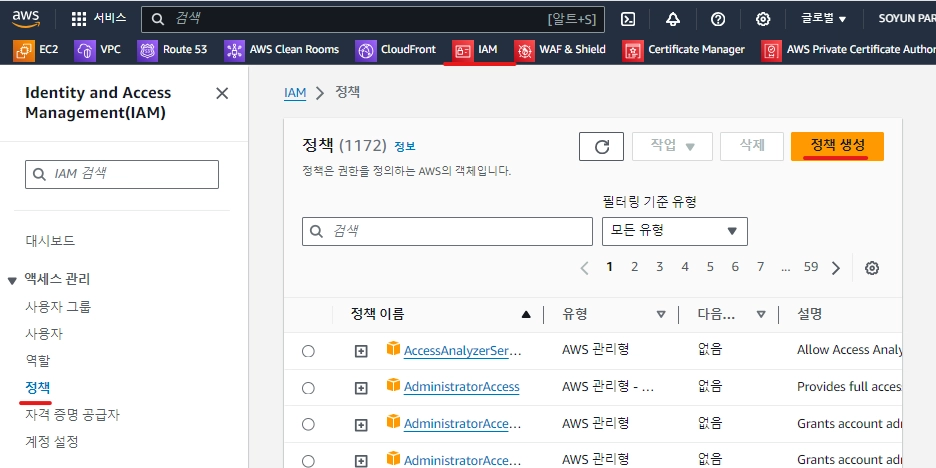
[서비스 선택]에 무수히 많은 것이 있다
우리는 오늘 Lambda에 대해서 배울 것이기에 Lambda로 지정하자

[Lambda]를 지정한 뒤 [JSON] 클릭

다음 해당 페이지가 나오는데 [정책 편집기]에 있는 내용을 모두 지운다.

[EC2 시작/중지 정책]
{
"Version": "2012-10-17",
"Statement": [
{
"Effect": "Allow",
"Action": [
"logs:CreateLogGroup",
"logs:CreateLogStream",
"logs:PutLogEvents"
],
"Resource": "arn:aws:logs:*:*:*"
},
{
"Effect": "Allow",
"Action": [
"ec2:Start*",
"ec2:Stop*"
],
"Resource": "*"
}
]
}
Shell
복사
[RDS 시작/중지 정책]
{
"Version": "2012-10-17",
"Statement": [
{
"Effect": "Allow",
"Action": [
"logs:CreateLogGroup",
"logs:CreateLogStream",
"logs:PutLogEvents"
],
"Resource": "arn:aws:logs:*:*:*"
},
{
"Effect": "Allow",
"Action": [
"rds:Start*",
"rds:Stop*"
],
"Resource": "*"
}
]
}
Shell
복사
1.
WEB, WAS 인스턴스 시작하는 정책
#===================================================#
#This scrips is that how to STOP/START Service(EC2) with Lambda in AWS
#IaaS Service: RDS
#.NOTE:
# Author: Young chul Kim
# Last Updated: 11/18/2026
# Version 1.1
#===================================================#
import boto3
region = 'ap-northeast-2'
instances = ['i-12345cb6de4f78g9h', 'i-08ce9b2d7eccf6d26']
ec2 = boto3.client('ec2', region_name=region)
def lambda_handler(event, context):
ec2.start_instances(InstanceIds=instances)
print('started your instances: ' + str(instances))
Shell
복사
2.
WEB, WAS 인스턴스 중지하는 정책
#===================================================#
#This scrips is that how to STOP/START Service(EC2) with Lambda in AWS
#IaaS Service: RDS
#.NOTE:
# Author: Young chul Kim
# Last Updated: 11/18/2026
# Version 1.1
#===================================================#
import boto3
region = 'ap-northeast-2'
instances = ['i-0751f74162e75a24c', 'i-0d35173a802475463’, ’i-0b0ba867d7a68b229’, ‘i-09864d5f0b3ce8fb7’]
ec2 = boto3.client('ec2', region_name=region)
def lambda_handler(event, context):
ec2.stop_instances(InstanceIds=instances)
print('stopped your instances: ' + str(instances))
Shell
복사
3.
DB 인스턴스 시작하는 정책
#===================================================#
#This scrips is that how to STOP/START Service(RDS) with Lambda in AWS
#IaaS Service: RDS
#.NOTE:
# Author: Young chul Kim
# Last Updated: 11/18/2026
# Version 1.1
#===================================================#
import boto3
region = 'ap-northeast-2'
db_instance_identifier = 'mydb'
def lambda_handler(event, context):
ec2 = boto3.client('rds', region_name=region)
ec2.start_db_instance(DBInstanceIdentifier=db_instance_identifier)
print('started your RDS Instances: ' + str(db_instance_identifier))
Shell
복사
4.
DB 인스턴스 중지하는 정책
#===================================================#
#This scrips is that how to STOP/START Service(RDS) with Lambda in AWS
#IaaS Service: RDS
#.NOTE:
# Author: Young chul Kim
# Last Updated: 11/18/2026
# Version 1.1
#===================================================#
import boto3
region = 'ap-northeast-2'
db_instance_identifier = 'mydb'
def lambda_handler(event, context):
ec2 = boto3.client('rds', region_name=region)
ec2.stop_db_instance(DBInstanceIdentifier=db_instance_identifier)
print('stopped your RDS Instances: ' + str(db_instance_identifier))
Shell
복사
EC2 정책에 관한 구문 넣고 [다음] 클릭

[정책 이름]은 ‘EC2-ROLE-Lambda’로 지정
EC2-ROLE-Lambda
JavaScript
복사
[설명] 또한 정책 이름과 동일하게 지정
[정책 생성] 클릭

정책이 생성되고 검색하면 다음과 같이 나온다.

정책을 만들었으니 이번에는 역할을 생성하자
[IAM] - [역할] - [역할 생성] 클릭

역할은 총 3단계를 거친다~
1단계 : 신뢰할 수 있는 엔터티 유형에서
‘AWS 서비스’ 상태로
[서비스 또는 사용 사례]에 ‘Lambda’ 클릭 후 [다음]

2단계 : 권한 추가
[권한 정책]에서 아까 만든 정책을 찾아 지정 후 [다음]

3단계 : 태그 추가
[역할 이름]은 ‘EC2-Role-Instance-StartStop’으로 지정
EC2-Role-Instance-StartStop
JavaScript
복사

나머지 모두 디폴트로 두고 [역할 생성]

위 방법으로 각각 EC2와 RDS 시작, 중지하는 정책 생성


위 방법으로 각각 EC2와 RDS 시작, 중지하는 역활 생성


Lambda 함수생성
주의사항~ EC2 인스턴스와 RDS에 대한 Start, Stop 정책과 역활이 사전에 설정되어 있어야 합니다.
[Lambda] - [함수] - [함수 생성] 클릭


[함수 이름]은 사용자 원하는대로 지정
[런타임]은 ‘Python 3.9’로 지정
[실행 역할]은 ‘기존 역할 사용’ 지정하고 일단은 EC2에 대한 것으로 지정한다.
[함수 생성]

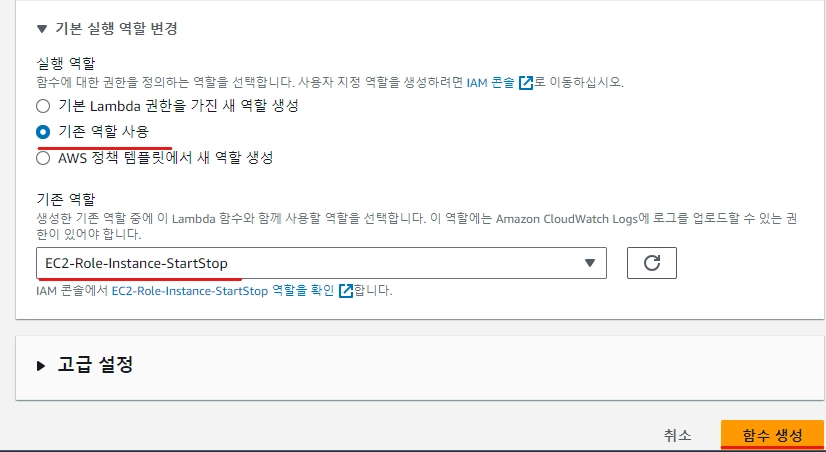
함수 생성되었으면 [코드]에서 생성된 코드 소스는 지우고~

1.
EC2 인스턴스 시작하는 정책
#===================================================#
#This scrips is that how to STOP/START Service(EC2) with Lambda in AWS
#IaaS Service: EC2
#.NOTE:
# Author: Young chul Kim
# Last Updated: 12/30/2025
# Version 1.1
#===================================================#
import boto3
region = 'ap-northeast-2'
instances = ['i-0762b9d7499b794e5','i-09f7e6487e1270215', 'i-0bd111e5bdb9172e5', 'i-087579743afb41d07','i-013df0c7dfca4d9e0']
ec2 = boto3.client('ec2', region_name=region)
def lambda_handler(event, context):
ec2.start_instances(InstanceIds=instances)
print('started your instances: ' + str(instances))
Shell
복사
보라색 글씨는 인스턴스(WEB,WAS 모두) ID임. 각자의 것으로 바꾸셔야 합니다.
2.
EC2 인스턴스 중지하는 정책
#===================================================#
#This scrips is that how to STOP/START Service(EC2) with Lambda in AWS
#IaaS Service: EC2
#.NOTE:
# Author: Young chul Kim
# Last Updated: 11/18/2026
# Version 1.1
#===================================================#
import boto3
region = 'ap-northeast-2'
instances = ['i-0762b9d7499b794e5','i-09f7e6487e1270215', 'i-0bd111e5bdb9172e5', 'i-087579743afb41d07','i-013df0c7dfca4d9e0']
ec2 = boto3.client('ec2', region_name=region)
def lambda_handler(event, context):
ec2.stop_instances(InstanceIds=instances)
print('stopped your instances: ' + str(instances))
Shell
복사
보라색 글씨는 인스턴스(WEB,WAS 모두) ID임. 각자의 것으로 바꾸셔야 합니다.
3.
DB 인스턴스 시작하는 정책
#===================================================#
#This scrips is that how to STOP/START Service(RDS) with Lambda in AWS
#IaaS Service: RDS
#.NOTE:
# Author: Young chul Kim
# Last Updated: 11/18/2026
# Version 1.1
#===================================================#
import boto3
region = 'ap-northeast-2'
db_instance_identifier = 'mydb'
def lambda_handler(event, context):
ec2 = boto3.client('rds', region_name=region)
ec2.start_db_instance(DBInstanceIdentifier=db_instance_identifier)
print('started your RDS Instances: ' + str(db_instance_identifier))
Shell
복사
4.
DB 인스턴스 중지하는 정책
#===================================================#
#This scrips is that how to STOP/START Service(RDS) with Lambda in AWS
#IaaS Service: RDS
#.NOTE:
# Author: Young chul Kim
# Last Updated: 11/18/2026
# Version 1.1
#===================================================#
import boto3
region = 'ap-northeast-2'
db_instance_identifier = 'mydb'
def lambda_handler(event, context):
ec2 = boto3.client('rds', region_name=region)
ec2.stop_db_instance(DBInstanceIdentifier=db_instance_identifier)
print('stopped your RDS Instances: ' + str(db_instance_identifier))
Shell
복사
붙여넣기 시행

[Test] - [Configure test event] 클릭

[이벤트 이름]에 원하는 이름만 지정 후 [저장]

저장되었으면 [Deploy]클릭 후 [Test] 누르면~

인스턴스 넘어가면 중지된 것을 볼 수 있음

나머지도 생성해보자~

1.
EC2 인스턴스 시작하는 정책
#===================================================#
#This scrips is that how to STOP/START Service(EC2) with Lambda in AWS
#IaaS Service: EC2
#.NOTE:
# Author: Young chul Kim
# Last Updated: 11/18/2026
# Version 1.1
#===================================================#
import boto3
region = 'ap-northeast-2'
instances = ['i-0ae27f8dc1e65c80f','i-0663f9fdf66e14b2d','i-09163b0d34e6e08fb','i-0073c5312ee59e4c5','i-0c2dc82d4b98326c6','i-0d674f7ed22ea3484']
ec2 = boto3.client('ec2', region_name=region)
def lambda_handler(event, context):
ec2.start_instances(InstanceIds=instances)
print('started your instances: ' + str(instances))
Shell
복사
보라색 글씨는 인스턴스(WEB,WAS 모두) ID임. 각자의 것으로 바꾸셔야 합니다.
2.
EC2 인스턴스 중지하는 정책
#===================================================#
#This scrips is that how to STOP/START Service(EC2) with Lambda in AWS
#IaaS Service: EC2
#.NOTE:
# Author: Young chul Kim
# Last Updated: 11/18/2026
# Version 1.1
#===================================================#
import boto3
region = 'ap-northeast-2'
instances = ['i-0a005372959fa66bc', 'i-0c963584f2411655a', 'i-0e72f261cc74debe3', 'i-08ab7d81da5bf17cc']
ec2 = boto3.client('ec2', region_name=region)
def lambda_handler(event, context):
ec2.stop_instances(InstanceIds=instances)
print('stopped your instances: ' + str(instances))
Shell
복사
보라색 글씨는 인스턴스(WEB,WAS 모두) ID임. 각자의 것으로 바꾸셔야 합니다.
3.
DB 인스턴스 시작하는 정책
#===================================================#
#This scrips is that how to STOP/START Service(RDS) with Lambda in AWS
#IaaS Service: RDS
#.NOTE:
# Author: Young chul Kim
# Last Updated: 11/18/2026
# Version 1.1
#===================================================#
import boto3
region = 'ap-northeast-2'
db_instance_identifier = 'mydb'
def lambda_handler(event, context):
ec2 = boto3.client('rds', region_name=region)
ec2.start_db_instance(DBInstanceIdentifier=db_instance_identifier)
print('started your RDS Instances: ' + str(db_instance_identifier))
Shell
복사
4.
DB 인스턴스 중지하는 정책
#===================================================#
#This scrips is that how to STOP/START Service(RDS) with Lambda in AWS
#IaaS Service: RDS
#.NOTE:
# Author: Young chul Kim
# Last Updated: 11/18/2026
# Version 1.1
#===================================================#
import boto3
region = 'ap-northeast-2'
db_instance_identifier = 'mydb'
def lambda_handler(event, context):
ec2 = boto3.client('rds', region_name=region)
ec2.stop_db_instance(DBInstanceIdentifier=db_instance_identifier)
print('stopped your RDS Instances: ' + str(db_instance_identifier))
Shell
복사
트리거 설정
[Lambda] - [함수] 에서 인스턴스 중지시키는 람다 함수 클릭
[트리거 추가] 클릭

[EventBridge (CloudWatch Events)]로 지정
[Rule]은 ‘Create a new rule’로 지정
[Rule Name]은 원하는 대로 지정
[Rule description]은 ‘Rule Name’지정
[Rule type]은 Schedule expression 으로 지정
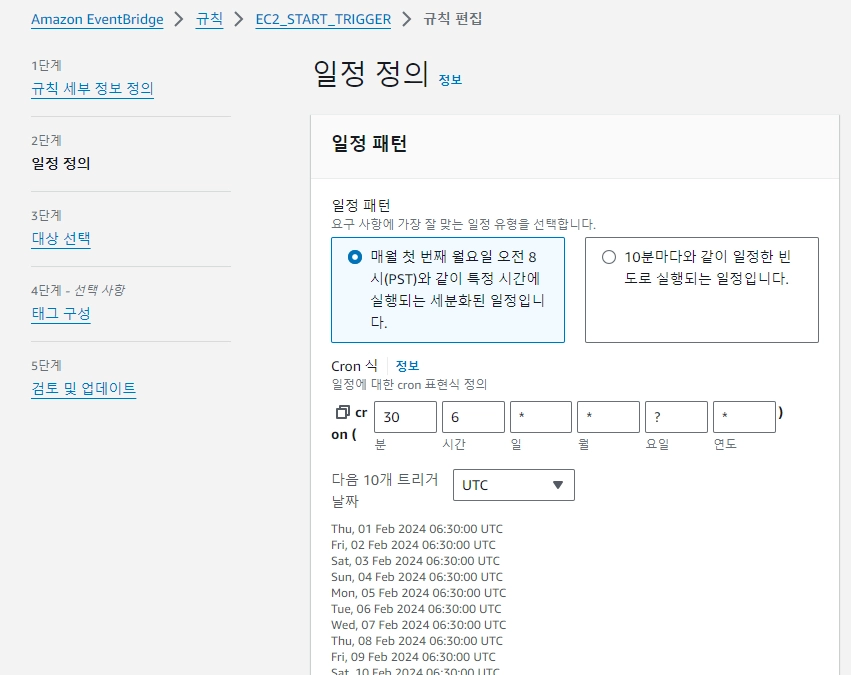
[Schedule expression]은 ‘cron(55 6 * * ? *)’으로 지정
해당 크론 의미는 15시 30분마다 요일 상관없이 매일 실행 하도록 지정
cron(55 6 * * ? *)
JavaScript
복사


다음과 같이 생성됨.
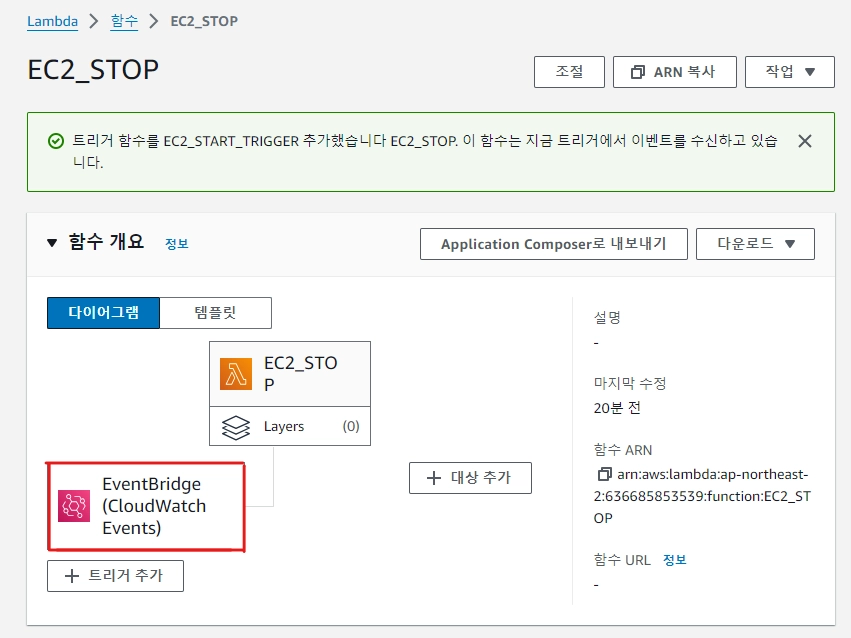
해당 트리거를 클릭하면 다음과 같이 나옴

만약 해당 트리거를 변경하고 싶다면 [편집]클릭

다음과 같이 단계를 거치며 수정이 가능하다.
인스턴스 Start/Stop 정책 생성
미리 인스턴스의 ID 정보 확인하기
그리고 이제부터 수업시간에는 WEB 2개, WAS 2개, Bestion 1개